
Overview
A development team wants to evaluate code-quality checks before integrating them into delivery pipelines. Build a disposable SonarQube Community Build environment with a PostgreSQL database, run one analysis, and inspect the resulting quality gate. The EC2 instance has no public IP; access to its web interface uses an authenticated Session Manager tunnel.
This project teaches host preparation, container persistence, database permissions, and analysis-token handling. It is a single-host evaluation: server and database share one failure boundary. Production needs a separately operated database, backups and restore tests, monitored capacity, upgrade planning, and an appropriate authenticated HTTPS access design. The instructions are original; their acceptance checks are expected outcomes, not a record of an executed cloud deployment.
Architecture
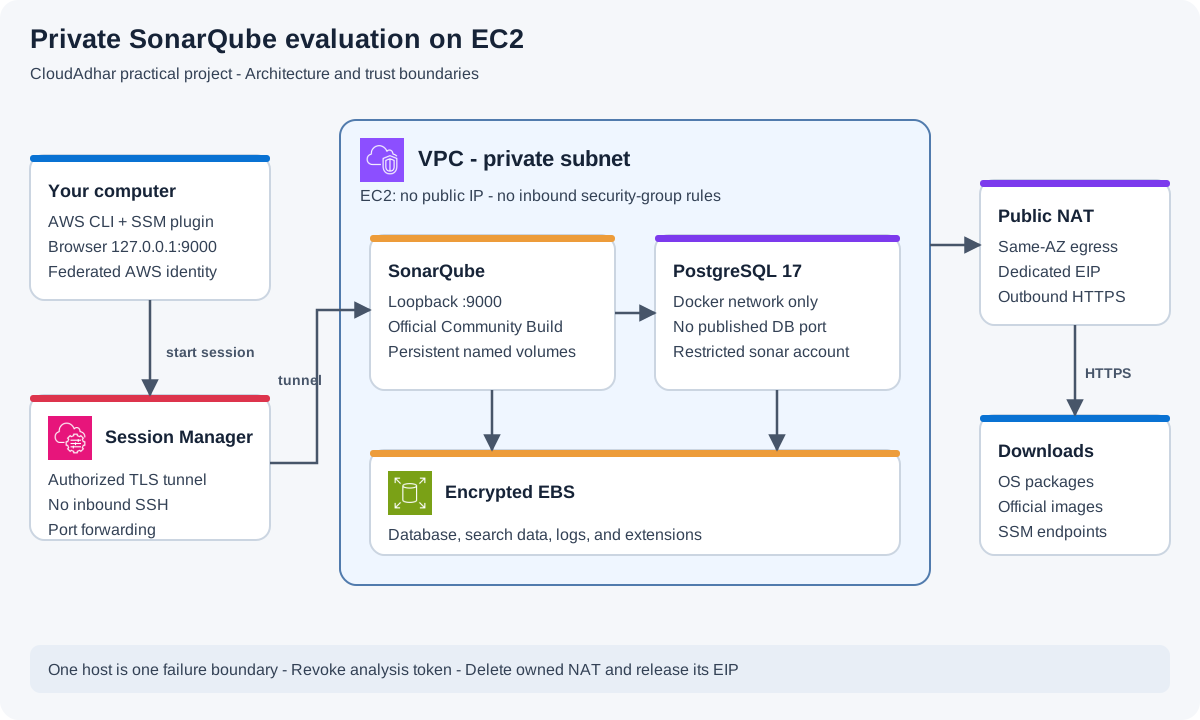
Open full-size architecture diagram
EC2 runs the official SonarQube and PostgreSQL images. A Docker bridge network connects them; PostgreSQL publishes no host port. SonarQube publishes port 9000 only on 127.0.0.1. Named volumes reside on encrypted EBS. A public NAT gateway supplies outbound HTTPS for packages, image downloads, and Systems Manager; it does not expose the instance to inbound internet connections. The scanner runs briefly on this same host.
Prerequisites
- Finish the account budget lab and two-AZ VPC lab. Identify one public subnet and one private subnet, preferably in the same AZ for this single-host exercise.
- Understand the role and Session Manager prerequisites in the EC2 lab. Create a dedicated EC2 role
ca-sonar-ec2-rolewith onlyAmazonSSMManagedInstanceCore; this application does not need AWS administrator permissions. - The operator needs permission to launch and terminate the dedicated instance, manage its security group, and pass only that role. NAT creation also requires VPC route, NAT, and Elastic IP permissions if existing authorized egress is unavailable.
- On your own computer, install AWS CLI v2 and the Session Manager plugin, and sign in with your normal federated AWS profile. The session operator needs
ssm:StartSessionfor this instance and theAWS-StartPortForwardingSessiondocument, plus permission to manage their own sessions. - Reserve budget for an 8 GiB EC2 instance, EBS, NAT gateway hours and processing, and its Elastic IP. These resources are not assumed free; a NAT gateway left running can dominate a short lab's bill.
Steps
1. Prepare private-subnet egress
If an approved NAT route already serves your lab subnet, record it and do not replace or later delete it. Otherwise, in VPC → NAT gateways → Create NAT gateway, choose a zonal public NAT gateway, name it ca-sonar-nat, select the public subnet, and allocate a dedicated Elastic IP. The public subnet's route table must already send 0.0.0.0/0 to the VPC internet gateway.
After the NAT gateway is Available, create a dedicated route table ca-sonar-private-rt in the VPC. Keep its local route, add 0.0.0.0/0 → ca-sonar-nat, and associate only the dedicated lab private subnet. Record its previous route-table association for cleanup. Do not change a shared workload subnet's routing. VPC DNS resolution and DNS hostnames should be enabled. NAT gateway setup
2. Launch and prepare the host
Create ca-sonar-sg with no inbound rules and outbound HTTPS TCP 443 → 0.0.0.0/0. Launch ca-sonar-host using the current Amazon Linux 2023 x86_64 AMI, t3.large (2 vCPU, 8 GiB), and a 40 GiB encrypted gp3 root volume with delete-on-termination enabled. Select the private subnet, disable public IPv4, choose no key pair, require IMDSv2, and attach ca-sonar-ec2-role.
Once Session Manager is available, connect through the console. Run these commands in the host's Bash shell:
sudo -i
dnf install -y docker openssl
systemctl enable --now docker
install -d -m 700 /opt/ca-sonar
cat > /etc/sysctl.d/99-ca-sonarqube.conf <<'CONF'
vm.max_map_count=524288
fs.file-max=131072
CONF
sysctl --system
sysctl vm.max_map_count fs.file-max
docker version
These Linux limits support SonarQube's search engine. Container limits are also set below. Keep normal kernel security features enabled; disabling bootstrap checks is not a repair for an undersized or misconfigured host. The official image supplies its required Java runtime. Linux requirements, AWS Docker installation
3. Resolve images and initialize a restricted database user
The official image catalog lists 26.9.0.129388-community when this guide was reviewed. PostgreSQL 17 is within the supported database range for this release. Pull the images and record their immutable digests; subsequent commands use those digests, including for the scanner, rather than following a moving tag. SonarQube image catalog, database compatibility
docker pull sonarqube:26.9.0.129388-community
docker pull postgres:17
docker pull sonarsource/sonar-scanner-cli:latest
SONAR_IMAGE=$(docker image inspect sonarqube:26.9.0.129388-community --format '{{index .RepoDigests 0}}')
POSTGRES_IMAGE=$(docker image inspect postgres:17 --format '{{index .RepoDigests 0}}')
SCANNER_IMAGE=$(docker image inspect sonarsource/sonar-scanner-cli:latest --format '{{index .RepoDigests 0}}')
printf 'SONAR_IMAGE=%s\nPOSTGRES_IMAGE=%s\nSCANNER_IMAGE=%s\n' \
  "$SONAR_IMAGE" "$POSTGRES_IMAGE" "$SCANNER_IMAGE" > /opt/ca-sonar/images.env

umask 077
PG_ADMIN_PASSWORD=$(openssl rand -hex 32)
SONAR_DB_PASSWORD=$(openssl rand -hex 32)
printf 'POSTGRES_PASSWORD=%s\n' "$PG_ADMIN_PASSWORD" > /opt/ca-sonar/postgres.env
printf 'SONAR_JDBC_URL=jdbc:postgresql://ca-sonar-db:5432/sonar\nSONAR_JDBC_USERNAME=sonar\nSONAR_JDBC_PASSWORD=%s\n' \
  "$SONAR_DB_PASSWORD" > /opt/ca-sonar/sonar.env
chmod 600 /opt/ca-sonar/*.env
docker network create ca-sonar-net
docker volume create ca-sonar-postgres
docker volume create ca-sonar-data
docker volume create ca-sonar-logs
docker volume create ca-sonar-extensions
docker run -d --name ca-sonar-db --restart unless-stopped \
  --network ca-sonar-net --env-file /opt/ca-sonar/postgres.env \
  --mount source=ca-sonar-postgres,target=/var/lib/postgresql/data \
  "$POSTGRES_IMAGE"
Run docker exec ca-sonar-db pg_isready -U postgres until it reports that connections are accepted. If startup fails, inspect docker logs ca-sonar-db before continuing. In the same root shell, create the application account without superuser or role-creation rights:
docker exec -i ca-sonar-db psql -U postgres -v ON_ERROR_STOP=1 <<SQL
CREATE ROLE sonar LOGIN PASSWORD '$SONAR_DB_PASSWORD' NOSUPERUSER NOCREATEDB NOCREATEROLE;
CREATE DATABASE sonar OWNER sonar ENCODING 'UTF8' TEMPLATE template0;
SQL
unset PG_ADMIN_PASSWORD SONAR_DB_PASSWORD
Expect CREATE ROLE and CREATE DATABASE. This initialization is for a fresh database volume; rerunning it against an existing volume should not silently reset users. The generated secrets stay in root-readable host files, not a repository. Host root and Docker administrators can still inspect container configuration. A production secret-delivery design needs stronger controls and rotation.
4. Start SonarQube on loopback
. /opt/ca-sonar/images.env
docker run -d --name ca-sonarqube --restart unless-stopped \
  --network ca-sonar-net \
  --publish 127.0.0.1:9000:9000 \
  --env-file /opt/ca-sonar/sonar.env \
  --ulimit nofile=131072:131072 --ulimit nproc=8192:8192 \
  --stop-timeout 120 \
  --mount source=ca-sonar-data,target=/opt/sonarqube/data \
  --mount source=ca-sonar-logs,target=/opt/sonarqube/logs \
  --mount source=ca-sonar-extensions,target=/opt/sonarqube/extensions \
  "$SONAR_IMAGE"
docker logs --tail 80 ca-sonarqube
Startup takes time. When the server reports ready, inspect the local status:
curl -fsS http://127.0.0.1:9000/api/system/status
curl -fsS http://127.0.0.1:9000/api/server/version
docker port ca-sonarqube
docker port ca-sonar-db
Expect status UP, the installed server version, a SonarQube mapping to 127.0.0.1:9000, and no published database port. Named volumes preserve state across container replacement; they are not independent backups. Container setup
5. Open a local tunnel and secure the first login
On your own computer, create a file sonar-tunnel.json:
{"portNumber":["9000"],"localPortNumber":["9000"]}Run this single command locally, replacing the instance ID and Region. Keep that terminal open:
aws ssm start-session --target i-REPLACE --document-name AWS-StartPortForwardingSession --parameters file://sonar-tunnel.json --region us-east-2Open http://127.0.0.1:9000 in your local browser. Traffic travels through the Session Manager tunnel; port 9000 is not opened in the security group. Use the initial SonarQube login admin / admin, then immediately set a unique password in your password manager. Keep user authentication required. Session Manager port forwarding does not provide a recording of the tunneled application session. AWS port forwarding
Create a local project manually with key cloudadhar-python and display name CloudAdhar Python lab. Select the local analysis workflow. Generate a project analysis token for this project with a short expiration, such as one day, and copy it once. Do not use a global analysis token. Token scope and expiration
6. Analyze a small project
Back in the EC2 root session, create these files. They contain no AWS or SonarQube credentials:
install -d -m 755 /opt/ca-sonar/sample
cat > /opt/ca-sonar/sample/calculator.py <<'PY'
def discounted_total(prices, discount_percent):
    if not 0 <= discount_percent <= 100:
        raise ValueError("Discount must be between 0 and 100")
    return round(sum(prices) * (1 - discount_percent / 100), 2)


if __name__ == "__main__":
    print(discounted_total([20, 30], 10))
PY
cat > /opt/ca-sonar/sample/sonar-project.properties <<'CONF'
sonar.projectKey=cloudadhar-python
sonar.projectName=CloudAdhar Python lab
sonar.sources=.
sonar.sourceEncoding=UTF-8
sonar.python.version=3.9
CONF
chown -R 1000:1000 /opt/ca-sonar/sample
chmod 755 /opt/ca-sonar/sample
chmod 644 /opt/ca-sonar/sample/calculator.py /opt/ca-sonar/sample/sonar-project.properties
. /opt/ca-sonar/images.env
read -rsp 'Project analysis token: ' SONAR_TOKEN
printf '\n'
export SONAR_TOKEN
export SONAR_HOST_URL=http://127.0.0.1:9000
docker run --rm --network host \
  --env SONAR_HOST_URL --env SONAR_TOKEN \
  --mount type=bind,source=/opt/ca-sonar/sample,target=/usr/src \
  "$SCANNER_IMAGE"
unset SONAR_TOKEN SONAR_HOST_URL
The token is read without terminal echo and passed through the environment, not written into the project properties. The scanner's Docker user requires read/write access to the mounted project directory; the dedicated sample directory is owned by UID 1000 for that reason. Host networking lets this short-lived Linux scanner reach the loopback-only server. Scanner container requirements
Expect the scanner to submit an analysis successfully. Wait for its background task in the web interface, then open the project and inspect the analyzed Python file, measures, and quality gate. Gate status depends on the active rules and new-code settings; do not equate successful upload with a passed gate or promise a specific issue count. Save the analysis time and gate result as evidence.
Troubleshooting
- Instance absent from Session Manager: check its role, NAT status, private route association, DNS, and outbound HTTPS. A public IP or inbound SSH rule is unnecessary.
- Search engine exits: inspect
docker logs ca-sonarqube, host memory, disk space, and both sysctl values. Keep at least 10% disk space free; do not disable search-engine checks. - Database login fails: verify container network membership and
SONAR_JDBC_URL. PostgreSQL initialization variables do not overwrite passwords in an existing data volume. - Scanner cannot write: check UID 1000 ownership on the sample directory. Do not make the Docker socket or secret directory world-writable.
- Browser cannot connect: keep the local SSM command running, ensure local port 9000 is unused, and check server status from the host first.
Verification
- EC2 has no public IPv4 address, and its security group has no inbound rules.
- SonarQube is reachable through the local tunnel; PostgreSQL has no host port mapping.
docker exec ca-sonar-db psql -U postgres -c '\du sonar'shows the application account without superuser attributes.- The project shows a completed analysis, an actual gate result, and the expected Python source. Record the server version and all three image digests.
- Restart
ca-sonarqube, wait forUP, and confirm the project remains. This proves basic persistence, not backup recovery.
Cost and cleanup
The Community Build image does not require a commercial SonarQube license, but EC2, EBS, and NAT/public IPv4 resources are chargeable. Stopping EC2 does not stop NAT or EBS charges. Docker image downloads also create NAT processing usage.
Revoke the project token and close the local tunnel. After saving any wanted evidence, stop and remove only these lab containers and volumes; this intentionally deletes the lab database:
docker stop ca-sonarqube ca-sonar-db
docker rm ca-sonarqube ca-sonar-db
docker volume rm ca-sonar-data ca-sonar-logs ca-sonar-extensions ca-sonar-postgres
docker network rm ca-sonar-net
Terminate the dedicated EC2 instance and verify its root EBS volume was deleted. Delete retained lab snapshots or volumes if you created them. Remove ca-sonar-sg, the dedicated instance profile, and its role. If you created the NAT and route table, restore the private subnet's previous route-table association, delete ca-sonar-private-rt, delete ca-sonar-nat, wait for deletion, and release its Elastic IP. Keep shared networking and pre-existing NAT resources. Finish by checking that no lab instance, EBS volume, NAT gateway, or allocated Elastic IP remains.
References
Official documentation reviewed on 23 September 2026: