
Overview
A small booking company is preparing a web application and a future database tier. Before deploying either, you need address space, clear internet boundaries, and room in two Availability Zones (AZs). Build that network here, then reuse it in the EC2 web-server lab and load-balancer lab.
You will create one dedicated VPC, two public subnets, two private subnets, and explicit route-table associations. Two AZs provide placement options; empty subnets do not make an application highly available. Replicated application instances, healthy-target routing, data resilience, and recovery procedures are separate work.
Architecture
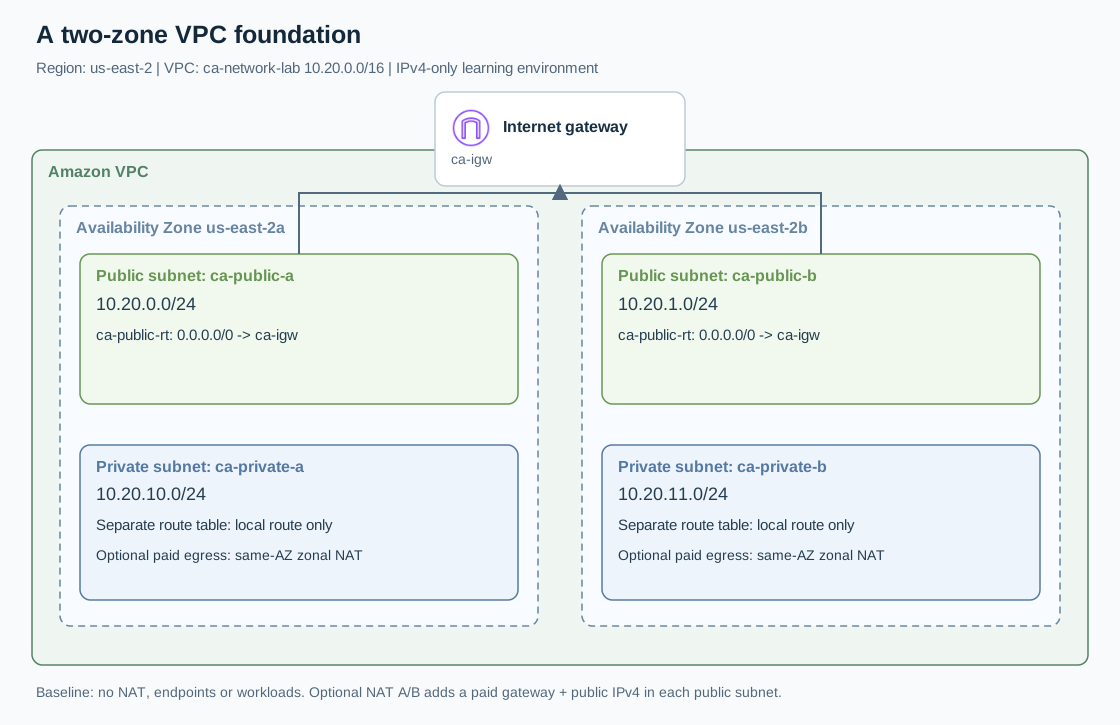
Open the full-size architecture diagram
Use Region US East (Ohio), us-east-2 and VPC ca-network-lab, CIDR 10.20.0.0/16.
| Subnet name | Availability Zone | IPv4 CIDR | Route table |
|---|---|---|---|
| ca-public-a | us-east-2a | 10.20.0.0/24 | ca-public-rt |
| ca-public-b | us-east-2b | 10.20.1.0/24 | ca-public-rt |
| ca-private-a | us-east-2a | 10.20.10.0/24 | ca-private-a-rt |
| ca-private-b | us-east-2b | 10.20.11.0/24 | ca-private-b-rt |
The public table has an internet-gateway route. Private tables initially contain only the VPC-local route, making those subnets isolated from external networks. Separate private tables allow a future default route to a NAT gateway in the matching AZ. Sharing one NAT would concentrate outbound dependency in one zone. See AWS routing examples.
Prerequisites
- An AWS sandbox account and a console identity permitted to create, tag, associate, and delete VPC resources; avoid the root user.
- Availability of
us-east-2aandus-east-2b; if unavailable, select two available zones and consistently record your substitutions. - No overlapping
10.20.0.0/16network that you plan to connect through peering, VPN, or Transit Gateway. - A note containing resource IDs, names, Region, and the planned cleanup time. NAT is optional and chargeable.
Steps
1. Create the network boundary
Open VPC → Your VPCs → Create VPC. Select VPC only, name ca-network-lab, manual IPv4 CIDR 10.20.0.0/16, no IPv6 CIDR, and default tenancy. Create it and record its vpc-... ID.
Select the new VPC, choose Actions → Edit VPC settings, and enable DNS resolution and DNS hostnames. Leave the automatically created main route table unchanged. This prevents an accidentally unassociated subnet from inheriting internet access. The AWS VPC creation guide describes these options.
2. Create four subnets
Open Subnets → Create subnet, select the recorded VPC ID, and enter the four rows from the architecture table. Check every AZ and CIDR before creating them. Record the returned subnet IDs alongside their names.
For each subnet, open Actions → Edit subnet settings and leave automatic public IPv4 assignment disabled. Later EC2 launches will opt in explicitly. A subnet's name and public-IP setting do not decide whether it is public; its route does. A public EC2 IPv4 connection also requires an instance public address and permitted traffic. See AWS subnet concepts.
3. Attach the internet gateway
Open Internet gateways → Create internet gateway and name it ca-igw. Select it, choose Actions → Attach to VPC, and select ca-network-lab. Confirm its state becomes Attached and its VPC ID matches your note.
Open Route tables → Create route table. Create ca-public-rt in that VPC. Under Routes → Edit routes, retain 10.20.0.0/16 → local and add 0.0.0.0/0 → Internet Gateway → ca-igw. Save; both routes should be active.
Under Subnet associations → Edit subnet associations, select only ca-public-a and ca-public-b. Save and verify two explicit associations.
4. Isolate the private subnets
Create ca-private-a-rt and ca-private-b-rt in the same VPC. Associate the first only with ca-private-a and the second only with ca-private-b. Keep each table's local route; add no default route.
Open each subnet's Route table tab and check the actual associated table. Do not infer associations from names. All four subnets should have explicit associations; the main table should have none. AWS route-table documentation explains this relationship.
5. Optional paid private internet egress
Skip this step for the subsequent beginner labs. To practice zonal NAT, create public NAT gateway ca-nat-a in ca-public-a, allocating a new Elastic IP. Repeat as ca-nat-b in ca-public-b. Use the subnet-based zonal workflow, with Public connectivity, and wait for both gateways to become Available.
Add 0.0.0.0/0 → NAT Gateway → ca-nat-a to ca-private-a-rt; add the corresponding ca-nat-b route to ca-private-b-rt. Never point a private table directly at the internet gateway. Record both NAT and Elastic IP allocation IDs. AWS NAT operations cover creation and deletion.
6. Diagnose before deploying
| Symptom | Check and correction |
|---|---|
| CIDR rejected | Compare all four subnet ranges; replace an overlapping range before creation. |
| Public subnet lacks internet route | Inspect its actual association and verify ca-igw is attached to this VPC. |
| Private subnet shows an IGW route | Reassociate it with the correct private table; review the other associations. |
| NAT route is blackhole | Confirm the target NAT exists and is available; repair or remove the stale route. |
Verification
Save screenshots of the VPC resource map and all three custom route tables. Your evidence must show four subnet IDs, two distinct AZs, two public associations, and separate private associations. Without NAT, neither private table should contain 0.0.0.0/0.
Explain a future private-instance outbound path: instance → its private table → same-AZ NAT → public table → internet gateway. This exercise validates configuration, not packet delivery or application failover.
Cost and cleanup
The baseline creates no EC2 instances, NAT gateways, or public addresses. Optional Ohio NAT pricing is currently $0.045 per gateway-hour plus $0.045 per processed GB; public IPv4 adds $0.005 per address-hour. Two NATs with one address each therefore start at $0.10/hour, before data and transfer; partial NAT hours round up. Recheck AWS VPC pricing before running.
If continuing the series, retain the baseline VPC but delete optional NATs now. Remove their default routes, delete both gateways, wait for deletion, then release both Elastic IPs. Deleting a NAT does not release its address.
For full cleanup, first remove dependent instances/load balancers from later labs. Delete the four subnets, three custom route tables, then detach/delete ca-igw and delete ca-network-lab. Verify no lab NAT, allocated Elastic IP, subnet, or VPC remains. Investigate dependency errors by resource ID; never delete an unrelated resource merely to clear the error.