
Overview
A booking team's status page must remain reachable during maintenance on one server. Create two identifiable Apache backends, put an Application Load Balancer (ALB) in front, and stop one web service to observe traffic shifting to the healthy target.
An ALB provides HTTP routing and health checks. It does not replace failed instances; this lab has no Auto Scaling group. Stopping Apache tests an application failure, not a complete Availability Zone outage. Use synthetic content over HTTP; production needs TLS and broader resilience controls.
Architecture
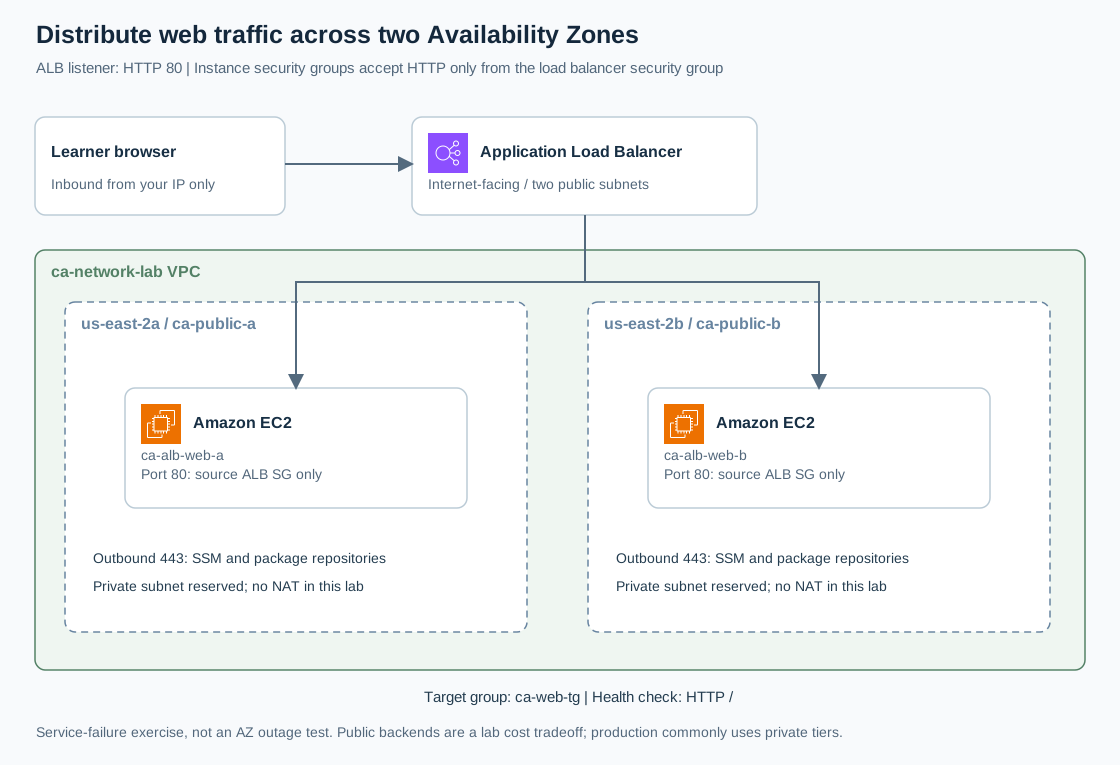
Open the full-size architecture diagram
Reuse VPC ca-network-lab in us-east-2: ca-public-a in us-east-2a and ca-public-b in us-east-2b. The ALB spans both. Each subnet contains one backend, ca-alb-web-a or ca-alb-web-b.
For this cost-conscious exercise, backends have public IPv4 addresses for package downloads and Session Manager, but their security group accepts HTTP only from the ALB security group. The ALB reaches their private addresses. Production commonly places backends in private subnets with deliberate egress; AWS's private-server example shows that variation.
Prerequisites
- Complete the VPC lab and EC2 lab, retaining the VPC and
ca-ec2-ssmrole. Terminate the earlier single server. - Permissions for EC2, security groups, ALB, target groups, passing the lab role, and Session Manager. Initial ALB creation may require its service-linked role.
- Two available public subnets with IGW routes; each
/24must retain at least eight free IPs. AWS requires ALB subnets in different AZs; see ALB subnet requirements. - A stable public client IPv4 and a scheduled cleanup time; the load balancer is chargeable while idle.
Steps
1. Define the traffic boundary
In EC2 → Security Groups, create both groups in ca-network-lab before adding references:
| Group | Inbound | Outbound |
|---|---|---|
| ca-alb-sg | HTTP 80 from My IP /32 | HTTP 80 to ca-alb-web-sg |
| ca-alb-web-sg | HTTP 80 from ca-alb-sg | HTTPS 443 to 0.0.0.0/0 |
Replace each default outbound allow-all rule with the table's rule. Select the security-group ID as source/destination where named, not its name as a CIDR. Add no SSH rule. HTTP 80 serves both requests and health checks; AWS ALB security-group guidance explains these flows.
2. Launch two backends
Launch ca-alb-web-a in ca-public-a, then repeat as ca-alb-web-b in ca-public-b. For both choose AWS Amazon Linux 2023 x86_64, t3.micro, no key pair, public IPv4 enabled, only ca-alb-web-sg, encrypted 8 GiB gp3 with delete-on-termination, IAM profile ca-ec2-ssm, and IMDSv2 required.
Under Advanced details → User data, paste this on each launch:
#!/bin/bash
set -euxo pipefail
dnf install -y httpd
printf 'CloudAdhar backend: %s\n' "$(hostname)" > /var/www/html/index.html
printf 'ok\n' > /var/www/html/health.txt
systemctl enable --now httpd
Wait for running instances and passing status checks. Connect to each through Session Manager and run curl -fsS http://127.0.0.1/health.txt; both must return ok. Record each instance ID, AZ, hostname, and volume ID. User data runs as root and normally only on first boot; failure details appear in /var/log/cloud-init-output.log. See AWS user-data behavior.
3. Configure health checks
Open EC2 → Target Groups → Create target group. Choose Instances, name ca-web-tg, HTTP port 80, IPv4, VPC ca-network-lab, protocol version HTTP1. Set health-check protocol HTTP and path /health.txt.
Expand advanced health settings: traffic port, success code 200, interval 10 seconds, timeout 5 seconds, healthy threshold 2, unhealthy threshold 2. Register both recorded instance IDs on port 80, choosing Include as pending below, then create the group. Keep stickiness off and the default routing algorithm. Targets are not serving ALB traffic until the listener exists.
4. Create the ALB and listener
Open Load Balancers → Create load balancer → Application Load Balancer. Set name ca-two-zone-alb, Internet-facing, IPv4, VPC ca-network-lab. Map us-east-2a to ca-public-a and us-east-2b to ca-public-b. Select only ca-alb-sg.
Configure listener HTTP:80 with default action Forward to ca-web-tg. Leave optional integrations and capacity reservations off. Create, wait for Active, and copy its DNS name. In the target group's Targets tab, wait for both entries to become Healthy. The AWS ALB creation procedure describes the listener/target relationship.
5. Observe traffic and a controlled failure
Open http://ALB_DNS/ from your allowed computer. For repeated requests, use Bash on that same computer, replacing the sample hostname with the actual ALB DNS name:
ALB_DNS='paste-your-alb-dns-name-here'
for attempt in $(seq 1 20); do
  curl --connect-timeout 3 --max-time 6 -fsS "http://$ALB_DNS/"
  sleep 1
done
Expect both backend hostnames over repeated requests, without assuming strict alternation. CloudShell has a different public source address, so this My IP rule does not automatically permit it.
On backend A through Session Manager, run sudo systemctl stop httpd. Keep requests running and refresh target health until A is unhealthy and B remains healthy. Short failures can occur before health checks detect the problem; record them. Then run sudo systemctl start httpd, wait for healthy status, and repeat requests.
Do not stop both servers: when all registered targets are unhealthy, ALB can fail open. See AWS target health behavior.
6. Investigate unexpected results
- Unhealthy target: test
/health.txtlocally, confirm HTTP 200, inspect cloud-init logs, then check ALB outbound and instance inbound SG references. - ALB timeout: verify your current public IP, internet-facing scheme, IGW routes, and HTTP listener.
- HTTP 503: confirm targets are registered and their AZs enabled; inspect target status/reason.
- Direct instance HTTP works from your laptop: remove an unintended permissive rule or attached SG. The backend should accept HTTP only from
ca-alb-sg.
Consult AWS troubleshooting for the exact reason code before changing unrelated settings.
Verification
Save both healthy target entries with different AZs, responses identifying both hosts, and the A-unhealthy/B-healthy state. Verify recovery. Test the backend public IP directly from your laptop with a short curl timeout; it should fail while the ALB URL succeeds. Preserve the SG rules as evidence of the boundary.
Cost and cleanup
Budget for ALB hours and capacity-unit usage, two EC2 instances, two gp3 volumes, public IPv4 addresses, and data transfer. Public backends and internet-facing ALB nodes both consume chargeable IPv4 addresses. Review ELB pricing and VPC pricing; an idle ALB still costs money.
Delete ca-two-zone-alb first, then delete ca-web-tg after its listener dependency disappears. Terminate both recorded EC2 instances; verify their root volumes are deleted. Remove the outbound reference to ca-alb-web-sg from ca-alb-sg, delete ca-alb-web-sg, then delete ca-alb-sg after ALB interfaces disappear. Finally remove unused lab IAM resources and follow VPC cleanup. Confirm no lab load balancer, running instance, retained volume, NAT, or Elastic IP remains.