
Overview
A warehouse receives order requests from another application. Before creating a shipment, it needs to reject missing identifiers and impossible quantities. Build the validation component as an AWS Lambda function: AWS supplies the execution environment, while you provide a short handler that runs when invoked.
You will deploy Python 3.12 code, submit good and bad JSON events, and connect each result to its logs. This exercise validates data only; it does not save orders, send notifications, or create shipments. That makes repeated tests harmless and keeps the first function easy to inspect.
Architecture
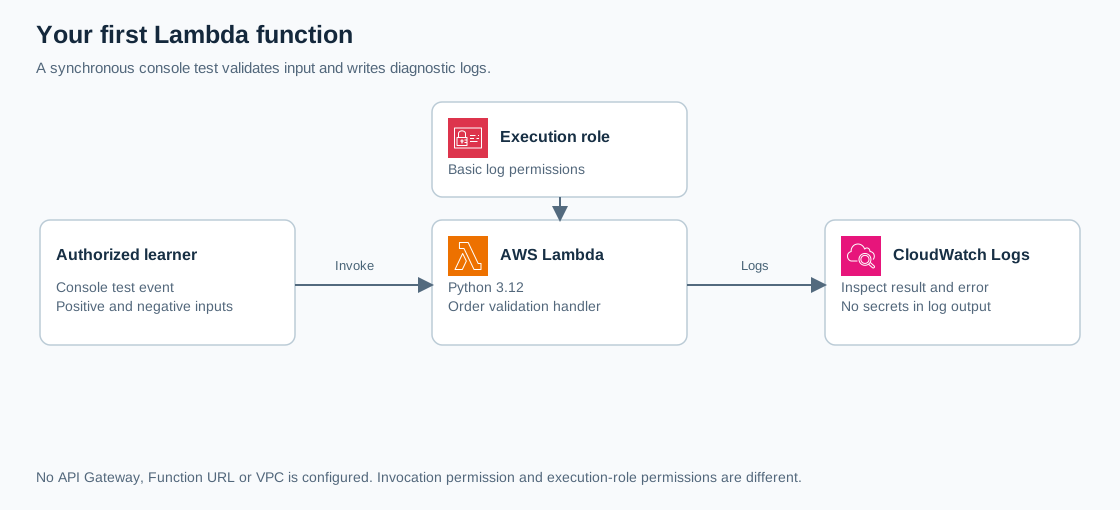
Open the full-size architecture diagram
The AWS console invokes Lambda using your signed-in identity. Lambda assumes an IAM execution role to write operational records to Amazon CloudWatch Logs. Your own permissions to invoke the function are separate from that role's permissions.
Python's standard library is sufficient, so there are no dependency packages. The function requires neither a VPC attachment nor a public endpoint. A reserved concurrency limit allows one execution at a time; it does not keep an execution environment warm. See the Lambda concurrency guide.
Prerequisites
- Complete account setup; use a non-root role and one AWS Region.
- Your operator needs permission to create, update, invoke, configure, and delete Lambda functions; manage this lab's IAM role; pass that role to Lambda; and read, configure, and delete its log group. Ask the account administrator for scoped access if denied.
- Use fictional input only. No access keys, passwords, or customer details belong in code, test events, or logs.
- Allow approximately 40 minutes. AWS preserves 100 concurrency units for unreserved functions; accounts with a low quota may be unable to reserve capacity.
Steps
1. Create the logging role and function
In IAM > Roles > Create role, choose AWS service, then the Lambda use case. Attach only the AWS managed policy AWSLambdaBasicExecutionRole. Name the role cloudadhar-order-validator-role and create it. Its trust relationship must allow lambda.amazonaws.com to assume it. This basic policy enables log writes; it grants no database or notification access. Review execution roles.
Open Lambda > Functions > Create function > Author from scratch. Enter cloudadhar-order-validator, select Python 3.12, and keep x86_64. Under permissions, select the existing role you just created. Keep the default Lambda compute configuration; do not select Managed Instances. Leave Function URL and VPC configuration unset, then create the function. Python 3.12 is a supported Lambda runtime.
2. Configure execution limits
Under Configuration > General configuration > Edit, set memory to 128 MB and timeout to 3 seconds. Save. Under Configuration > Concurrency > Edit, reserve 1 concurrent execution; leave provisioned concurrency unconfigured. If your quota blocks reservation, leave concurrency unreserved and record that exception. Run only the finite manual tests below, with no trigger; arrange a suitable limit before adding event sources later.
Under Configuration > Asynchronous invocation > Edit, set maximum event age to 1 minute and retry attempts to 0. Save. These settings govern asynchronous delivery, not the console tests below. Zero retries disables retries for function errors; throttling and service errors can still cause retry attempts until event age expires. Future production integrations need their own delivery and recovery design. See asynchronous configuration and error handling.
3. Deploy the handler
In Code, replace lambda_function.py with this code. Keep the runtime handler as lambda_function.lambda_handler, leave logging format as Text, then choose Deploy and wait for completion.
import logging
import re

logger = logging.getLogger()
logger.setLevel(logging.INFO)


def lambda_handler(event, context):
    if not isinstance(event, dict):
        raise ValueError("event must be a JSON object")

    order_id = event.get("order_id")
    quantity = event.get("quantity")
    if not isinstance(order_id, str) or not re.fullmatch(
        r"ORD-[0-9]{4}", order_id
    ):
        raise ValueError("order_id must match ORD- followed by four digits")
    if type(quantity) is not int or not 1 <= quantity <= 100:
        raise ValueError("quantity must be an integer from 1 to 100")

    logger.info("order_validated request_id=%s", context.aws_request_id)
    return {
        "accepted": True,
        "order_id": order_id,
        "quantity": quantity,
    }
The explicit integer type check rejects JSON booleans, which Python otherwise treats as integers. The log records an invocation identifier without copying the input. Lambda serializes the returned dictionary for the synchronous caller; there is no HTTP application response or database write. See Python handler behavior.
4. Exercise both paths
Open Test > Create new event. Choose Private, name it valid-order, replace the template with this JSON, save, then choose Test.
{"order_id":"ORD-1001","quantity":3}Expect a successful execution containing:
{"accepted":true,"order_id":"ORD-1001","quantity":3}Create a second private event named invalid-quantity:
{"order_id":"ORD-1001","quantity":0}Expect a failed execution with errorType equal to ValueError and errorMessage equal to quantity must be an integer from 1 to 100. This deliberate failure proves validation runs. Test {} separately to exercise the identifier rule. Console tests are synchronous invocations, so these failures are not automatically retried by Lambda.
5. Inspect the evidence
Choose Monitor > View CloudWatch logs. Open /aws/lambda/cloudadhar-order-validator, select the newest relevant stream, and locate the request ID from your successful result. Expect order_validated and runtime duration/memory information. Find the failed invocation's validation error. Set the log group's retention to 1 day through its retention setting. The Python logging guide explains these records.
Verification
- Save the valid response, invalid error, and corresponding request IDs.
- Confirm Python 3.12, logging-only role, 128 MB, three-second timeout, and reserved concurrency 1 or your recorded quota exception.
- Confirm no trigger or Function URL was added.
If tests show old results, deploy the edited code and confirm you are testing $LATEST. For Runtime.HandlerNotFound, check the filename and handler setting. Missing logs usually mean the wrong Region, a short delivery delay, or missing role permissions. A throttled test requires checking concurrent executions and whether reserved concurrency is accidentally zero.
Cost and cleanup
Lambda bills for requests and execution duration; CloudWatch charges for log ingestion and storage. Credits and free allowances depend on the account. Review Lambda pricing before extending this exercise.
Delete the function through Lambda > Functions > Actions > Delete. Then delete /aws/lambda/cloudadhar-order-validator in CloudWatch Logs; function deletion does not remove retained logs. Delete cloudadhar-order-validator-role in IAM only after confirming nothing else uses it. Check that all three lab resources are absent. No provisioned concurrency, endpoint, or scheduled trigger should remain.