
Overview
A campus application should download approved documents from one S3 prefix. It should neither read private documents nor delete anything. Turn that requirement into a policy and collect evidence for positive and negative cases before attaching it to a workload role.
This is an authorization experiment. The sample bucket names are fictional; no bucket or IAM role is created. The simulator evaluates supplied policies without executing the operations. A successful simulation is useful evidence, but a live workload can also be affected by organization policies, boundaries, resource policies and encryption permissions that this small test does not include.
Architecture
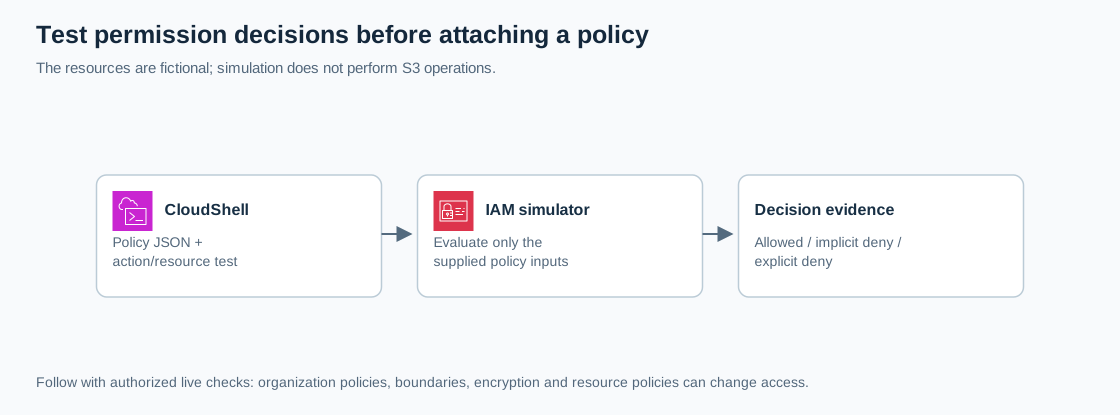
Open the full-size architecture diagram
IAM is the permission system, CloudShell provides a browser terminal, and S3 object ARNs describe the resources being evaluated. Choose this workflow during code review or troubleshooting. Follow it with authorized tests on dedicated real resources before production deployment.
Prerequisites
- Complete the account security baseline.
- A non-root learning session that can use standard AWS CloudShell and
iam:SimulateCustomPolicy. - Permission to simulate policies is different from the permissions in the sample policy. Ask the sandbox owner for the simulator action if it is denied.
- Commands below use the Bash shell in CloudShell, not Windows PowerShell.
Steps
1. Confirm the session
Open CloudShell from the AWS console and run:
aws sts get-caller-identityCheck the account and assumed role against your lab notes. Keep the output private. Stop if you are in a production account or using root credentials.
2. Write the proposed permission
Create a local policy file. This does not attach permissions to your current identity:
cat > cloudadhar-read-policy.json <<'JSON'
{
  "Version": "2012-10-17",
  "Statement": [
    {
      "Sid": "ReadApprovedDocuments",
      "Effect": "Allow",
      "Action": "s3:GetObject",
      "Resource": "arn:aws:s3:::cloudadhar-policy-example/approved/*"
    }
  ]
}
JSON
The trailing object path matters. Bucket-level actions such as s3:ListBucket use the bucket ARN; s3:GetObject uses an object ARN. This application knows the object key and is not being given bucket listing permission.
3. Evaluate the approved object
aws iam simulate-custom-policy \
  --policy-input-list file://cloudadhar-read-policy.json \
  --action-names s3:GetObject s3:DeleteObject \
  --resource-arns arn:aws:s3:::cloudadhar-policy-example/approved/brief.txt \
  --query 'EvaluationResults[].{Action:EvalActionName,Decision:EvalDecision}' \
  --output table
Expect allowed for GetObject and implicitDeny for DeleteObject. An implicit deny means the supplied policy contains no matching allow; it is not an explicit deny statement.
4. Test an object outside the prefix
Repeat the simulation with one action and a different resource:
aws iam simulate-custom-policy \
  --policy-input-list file://cloudadhar-read-policy.json \
  --action-names s3:GetObject \
  --resource-arns arn:aws:s3:::cloudadhar-policy-example/private/marks.txt \
  --query 'EvaluationResults[].{Action:EvalActionName,Decision:EvalDecision}' \
  --output table
Expect implicitDeny. Record this as a required negative test. A policy that passes only the approved download test could still allow too much.
5. Observe explicit deny precedence
Create a second policy representing a blocked document, then evaluate both supplied policies together:
cat > cloudadhar-deny-policy.json <<'JSON'
{
  "Version": "2012-10-17",
  "Statement": [
    {
      "Sid": "BlockWithdrawnDocument",
      "Effect": "Deny",
      "Action": "s3:GetObject",
      "Resource": "arn:aws:s3:::cloudadhar-policy-example/approved/brief.txt"
    }
  ]
}
JSON
aws iam simulate-custom-policy \
  --policy-input-list "$(cat cloudadhar-read-policy.json)" "$(cat cloudadhar-deny-policy.json)" \
  --action-names s3:GetObject \
  --resource-arns arn:aws:s3:::cloudadhar-policy-example/approved/brief.txt \
  --query 'EvaluationResults[].{Action:EvalActionName,Decision:EvalDecision}' \
  --output table
Expect explicitDeny, even though the first policy allows this object. The deny file exists only in CloudShell and was not deployed.
Verification
| Policy inputs | Request | Expected result |
|---|---|---|
| Read policy | Get approved/brief.txt | allowed |
| Read policy | Delete approved/brief.txt | implicitDeny |
| Read policy | Get private/marks.txt | implicitDeny |
| Read and deny policies | Get approved/brief.txt | explicitDeny |
Save all four results with an explanation of their causes. State the scope of your conclusion: you tested these supplied documents against these action/resource pairs, not every control in an AWS account.
Troubleshooting
An API AccessDenied error means your actual session cannot invoke the simulator; it is different from a successful response containing implicitDeny. A malformed-policy error usually points to JSON syntax. An unexpected allowed result calls for checking the exact ARN, action and list of input files. Do not solve these issues by attaching AdministratorAccess.
Cost and cleanup
This exercise provisions no billable storage or compute. Standard CloudShell is provided without additional service charge, subject to its service limits; this lab uses no other billable API operations. Remove only cloudadhar-read-policy.json and cloudadhar-deny-policy.json from your CloudShell home directory after saving your redacted evidence. Leave account security settings intact.