
Overview
Someone created a storage bucket in a shared learning account. Your job is to identify when it happened, which identity made the request, and whether the evidence refers to the correct resource. Reproduce the scenario with a dedicated empty bucket, then investigate it through CloudTrail Event history.
CloudTrail records AWS API activity. CloudWatch observes metrics, logs and alarms. Choose CloudTrail for questions about account changes; choose CloudWatch for questions about application behavior and resource health. A good incident report separates recorded facts from assumptions about the human behind an identity.
Architecture
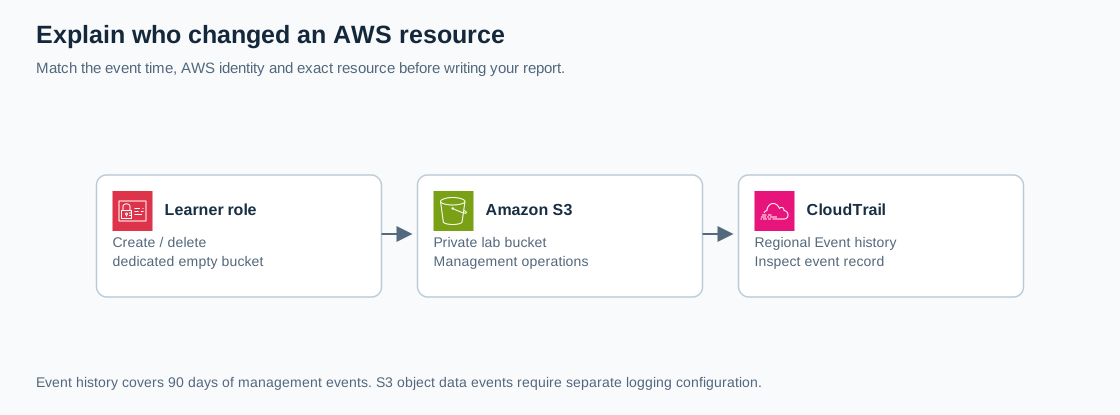
Open the full-size architecture diagram
Event history provides regional management events from the previous 90 days without configuring a trail. It is not a complete object-download audit. S3 object operations are data events and require separate logging configuration. This lab does not create a trail, a CloudTrail Lake store or data-event collection.
Prerequisites
- An authorized non-root learning account with permission to create and delete a dedicated S3 bucket and view CloudTrail Event history.
- Complete the account security baseline.
- Choose
us-east-2and use it consistently for this exercise. Record the start time in UTC. - A private notebook for account identifiers and raw event records. Publish only redacted evidence.
Steps
1. Plan a unique resource
Choose an available bucket name such as cloudadhar-audit-<your-random-suffix>. Replace the entire placeholder; use lowercase letters, numbers and hyphens. Record it before creating anything so you can distinguish your test from other learners' changes.
2. Create the empty private bucket
Open S3, choose Create bucket, select a general-purpose bucket in us-east-2, and enter your unique name. Keep Block Public Access enabled and ACLs disabled. Leave versioning off for this disposable empty bucket and use the default encryption configuration. Create it without uploading documents or enabling optional logging.
Record the creation confirmation and approximate UTC time. A screenshot of a bucket alone is insufficient evidence of who created it; that is what you will investigate next.
3. Locate the management event
Open CloudTrail, select us-east-2, and open Event history. Set a time window covering the exercise. Choose Event name as the lookup attribute and enter CreateBucket. CloudTrail supports one lookup attribute at a time, so replace an existing attribute instead of stacking incompatible filters.
Refresh after a few minutes if the event has not arrived. Match the bucket in the event details; do not select another learner's similarly timed event. The default read-only exclusion is suitable for this create operation. When investigating read management calls later, remove that exclusion as needed.
4. Read the event record
Open the matching event and inspect its JSON. Capture these fields in your private notes:
| Field | Question it answers |
|---|---|
| eventTime | When did AWS record the request? |
| eventName and eventSource | Which API and service were involved? |
| awsRegion | Which region handled this event? |
| userIdentity | Which AWS identity made the request? |
| requestParameters | Does the requested bucket match your lab? |
| eventID | Which record supports the report? |
For an assumed role, inspect the role session and session issuer information. A session name is context, not proof of a person's real-world identity. Check for error fields before calling an event successful. Avoid treating an unfamiliar source IP as proof of an attack; console and service-mediated requests need context.
5. Prove that cleanup is also auditable
Return to S3 and delete only the exact empty bucket created in step 2. Confirm its name in the deletion prompt. Return to Event history, change the Event name lookup to DeleteBucket, and wait for the matching event. Record its time, resource and identity.
6. Write a short change report
Write a five-line report: resource, create event, delete event, identity evidence, and investigation limits. State that the bucket was empty and this exercise did not capture object data events. Include redacted screenshots or JSON excerpts with account numbers, email addresses and session details removed before sharing.
Verification
- A CreateBucket event matches the exact unique bucket and selected region.
- A DeleteBucket event matches the same bucket after cleanup.
- Your report distinguishes event time, identity and resource instead of relying on screenshots alone.
- You can explain why Event history would not establish who downloaded an object.
- The bucket no longer exists in your S3 list.
Troubleshooting
No result usually means the wrong region, time range, lookup attribute or insufficient delivery time. An AccessDenied error requires the owner to review read permissions. If an event contains an error code, report a failed request rather than a completed change. Existing organization trails are independent controls: do not disable them to make this exercise simpler.
Cost and cleanup
CloudTrail Event history has no additional charge. This exercise creates an empty bucket briefly; any added storage, requests or optional logging can change cost. Confirm deletion of your dedicated bucket and retain only redacted evidence. Event history itself is not manually erased during cleanup and expires under its retention behavior. Do not create paid data stores or extra trails for this exercise.