
Overview
A reporting team needs to read weekly exports, but its application role can also overwrite and delete every object in the export bucket. Your assignment is to document the required access, review the policy, and remove unnecessary permissions without breaking report downloads.
Build a disposable version of this problem. The acceptance contract is deliberately small: list reports/, read reports/weekly.txt, and deny access to private/, writes, and deletes. Produce a before-and-after policy and an evidence table that another reviewer can repeat. Use synthetic text files throughout.
This project suits a role-permission review before a deployment or ownership handover. It does not establish that a production role is least privilege: real reviews also account for resource policies, service control policies, permissions boundaries, other attached policies, and business requirements. AWS recommends temporary credentials and progressively reducing permissions. IAM security best practices
These are authoring-reviewed instructions, not a claim that CloudAdhar executed this project in your account.
Architecture
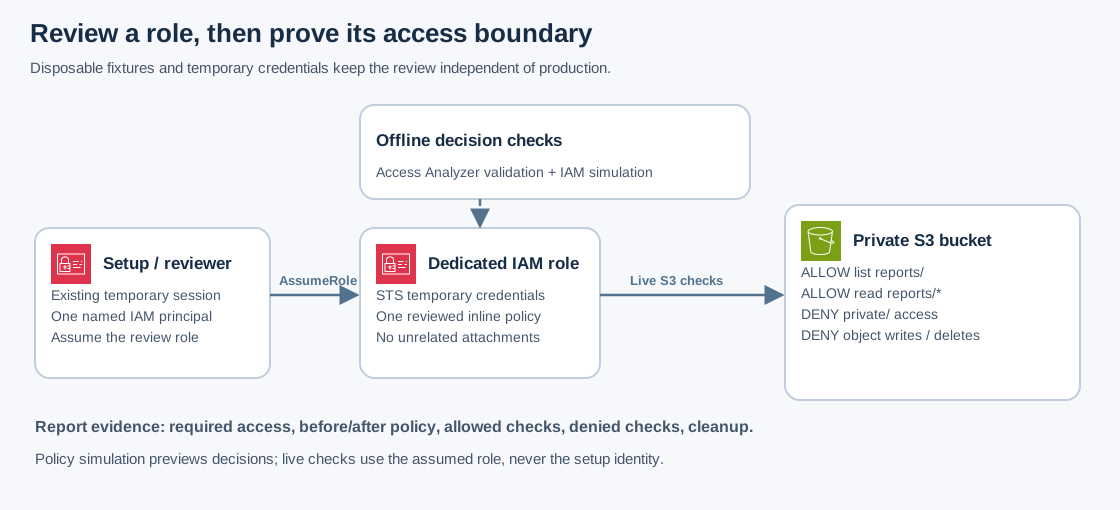
The setup identity owns the disposable resources. A separate role is the subject of the review. AWS STS issues temporary credentials for that role; the live S3 checks use those credentials. IAM Access Analyzer validates policy structure and recommendations, while the IAM policy simulator previews individual decisions. Neither substitutes for the live checks.
No IAM user, access key, public bucket policy, or analyzer resource is required. Keep the review role free of unrelated managed policies and permissions boundaries so this controlled experiment has one obvious source of permission.
Prerequisites
- A disposable AWS account or approved sandbox, AWS CLI v2, Bash, and
jq; use an existing SSO or other temporary administrative session. - Setup permissions to create/delete the named S3 bucket and its objects; create/get/delete a role and its inline policy; call
access-analyzer:ValidatePolicy,iam:SimulateCustomPolicy, andsts:AssumeRoleon the test role. Apply your organization's existing provisioning boundaries. - The IAM ARN of the existing person or role that will assume the review role. Obtain it from IAM or your administrator. An STS
assumed-rolesession ARN is not the IAM role ARN required below. - A unique suffix and an empty local working directory. Commands use
us-east-1to keep bucket creation consistent. Do not substitute an existing bucket or production role.
Steps
1. Define the access contract and create fixtures
Run this in one Bash session. Replace the principal ARN and suffix. Confirm the account printed by STS before continuing. Bucket names are globally unique.
export AWS_REGION=us-east-1
export AWS_DEFAULT_REGION="$AWS_REGION"
ACCOUNT_ID=$(aws sts get-caller-identity --query Account --output text)
aws sts get-caller-identity
SUFFIX="replace-with-your-unique-suffix"
BUCKET="cloudadhar-access-review-${ACCOUNT_ID}-${SUFFIX}"
ROLE_NAME="cloudadhar-report-review-${SUFFIX}"
REVIEWER_PRINCIPAL_ARN="arn:aws:iam::${ACCOUNT_ID}:role/REPLACE_WITH_EXISTING_ROLE"

aws s3api create-bucket --bucket "$BUCKET"
aws s3api put-public-access-block --bucket "$BUCKET" \
  --public-access-block-configuration \
  BlockPublicAcls=true,IgnorePublicAcls=true,BlockPublicPolicy=true,RestrictPublicBuckets=true
printf 'Synthetic weekly report: 12 completed exercises.\n' > weekly.txt
printf 'Synthetic internal planning note.\n' > internal.txt
aws s3api put-object --bucket "$BUCKET" --key reports/weekly.txt --body weekly.txt
aws s3api put-object --bucket "$BUCKET" --key private/internal.txt --body internal.txt
S3 supplies default encryption for new object uploads. Leave this bucket unversioned for the exact cleanup below; adding a customer-managed KMS key would introduce a separate permission boundary and chargeable resource outside this experiment.
2. Capture the intentionally broad starting policy
The starting policy is overbroad only within this new bucket. It never grants all-account S3 administration. The trust policy names your existing IAM principal; it does not trust the entire account indiscriminately.
jq -n --arg principal "$REVIEWER_PRINCIPAL_ARN" \
  '{Version:"2012-10-17",Statement:[{Effect:"Allow",Principal:{AWS:$principal},Action:"sts:AssumeRole"}]}' \
  > trust.json
aws iam create-role --role-name "$ROLE_NAME" \
  --assume-role-policy-document file://trust.json

jq -n --arg bucket "arn:aws:s3:::$BUCKET" \
  '{Version:"2012-10-17",Statement:[
    {Effect:"Allow",Action:"s3:ListBucket",Resource:$bucket},
    {Effect:"Allow",Action:["s3:GetObject","s3:PutObject","s3:DeleteObject"],Resource:($bucket+"/*")}
  ]}' > before.json
aws iam put-role-policy --role-name "$ROLE_NAME" \
  --policy-name ReportAccess --policy-document file://before.json
aws iam get-role-policy --role-name "$ROLE_NAME" --policy-name ReportAccess \
  --query PolicyDocument --output json > before-from-aws.json
Write a review note: the role needs read access to reports, but currently has write/delete access and can read internal material. Also inspect list-attached-role-policies and get-role: there should be no attached managed policies or permissions boundary on this newly created role. A boundary limits grants; it does not grant permissions itself. Permissions boundaries
3. Create and validate the replacement policy
ListBucket applies to the bucket ARN; GetObject applies to object ARNs. The list condition requires callers to explicitly request a report prefix. A prefix is a naming boundary, not a separate S3 folder resource.
jq -n --arg bucket "arn:aws:s3:::$BUCKET" \
  '{Version:"2012-10-17",Statement:[
    {Sid:"ListReports",Effect:"Allow",Action:"s3:ListBucket",Resource:$bucket,
     Condition:{StringLike:{"s3:prefix":["reports/","reports/*"]}}},
    {Sid:"ReadReports",Effect:"Allow",Action:"s3:GetObject",Resource:($bucket+"/reports/*")}
  ]}' > candidate.json

aws accessanalyzer validate-policy --policy-type IDENTITY_POLICY \
  --policy-document file://candidate.json --output json > validation.json
jq '.findings[] | {findingType,issueCode,findingDetails}' validation.json
jq -e '[.findings[] | select(.findingType == "ERROR")] | length == 0' validation.json
The final command should print true. Resolve errors before attaching the policy, and read any security warnings or suggestions. Validation is a policy check, not a proof that the selected access meets the business requirement. Access Analyzer policy validation
4. Preview both sides of the boundary
Run these simulations while still using the setup identity. Expect allowed for the report read and implicitDeny for the private read and both report mutations.
aws iam simulate-custom-policy --policy-input-list file://candidate.json \
  --action-names s3:GetObject \
  --resource-arns "arn:aws:s3:::$BUCKET/reports/weekly.txt" "arn:aws:s3:::$BUCKET/private/internal.txt" \
  --query 'EvaluationResults[].{Resource:EvalResourceName,Decision:EvalDecision}'
aws iam simulate-custom-policy --policy-input-list file://candidate.json \
  --action-names s3:PutObject s3:DeleteObject \
  --resource-arns "arn:aws:s3:::$BUCKET/reports/weekly.txt" \
  --query 'EvaluationResults[].{Action:EvalActionName,Decision:EvalDecision}'
for PREFIX in reports/ private/; do
  aws iam simulate-custom-policy --policy-input-list file://candidate.json \
    --action-names s3:ListBucket --resource-arns "arn:aws:s3:::$BUCKET" \
    --context-entries "ContextKeyName=s3:prefix,ContextKeyValues=$PREFIX,ContextKeyType=string" \
    --query 'EvaluationResults[].{Action:EvalActionName,Decision:EvalDecision}'
done
The two list tests should be allowed, then implicitly denied. Simulation does not make S3 requests and has limitations around policies and context. Save its output separately from live evidence. Policy simulator limitations
5. Apply, assume, and perform live checks
aws iam put-role-policy --role-name "$ROLE_NAME" \
  --policy-name ReportAccess --policy-document file://candidate.json
ROLE_ARN="arn:aws:iam::${ACCOUNT_ID}:role/${ROLE_NAME}"
ROLE_CREDS=$(aws sts assume-role --role-arn "$ROLE_ARN" \
  --role-session-name controlled-access-review --duration-seconds 900 \
  --query Credentials --output json)

run_as_reviewer() (
  export AWS_ACCESS_KEY_ID=$(jq -r .AccessKeyId <<< "$ROLE_CREDS")
  export AWS_SECRET_ACCESS_KEY=$(jq -r .SecretAccessKey <<< "$ROLE_CREDS")
  export AWS_SESSION_TOKEN=$(jq -r .SessionToken <<< "$ROLE_CREDS")
  unset AWS_PROFILE
  aws "$@"
)
run_as_reviewer sts get-caller-identity
run_as_reviewer s3api list-objects-v2 --bucket "$BUCKET" --prefix reports/
run_as_reviewer s3api get-object --bucket "$BUCKET" \
  --key reports/weekly.txt downloaded-report.txt
cmp weekly.txt downloaded-report.txt
If assume-role fails immediately after creation, confirm both the trust principal and caller permission, then allow a short interval for IAM propagation and retry. Do not fix it with wildcard trust. Never print or save ROLE_CREDS in your evidence.
Run each negative test and inspect the error. A network failure or expired session is not evidence of an authorization denial. Each command below must return a nonzero exit status with AccessDenied.
run_as_reviewer s3api list-objects-v2 --bucket "$BUCKET" --prefix private/
run_as_reviewer s3api get-object --bucket "$BUCKET" --key private/internal.txt forbidden.txt
run_as_reviewer s3api put-object --bucket "$BUCKET" --key reports/unwanted.txt --body weekly.txt
run_as_reviewer s3api delete-object --bucket "$BUCKET" --key reports/weekly.txt
If any denied operation succeeds, stop and inspect the attached policies, inline policy, trust identity, and bucket policy. All targets here are disposable. Recreate the report with the setup identity if a faulty policy permitted its deletion, correct the policy, and repeat the complete matrix. Do not infer success from the S3 console: it makes additional list calls that this intentionally narrow policy does not allow.
Verification
Record the actual command exit status, decision, and UTC time for each row; redact account IDs if sharing publicly.
| Operation | Expected result | Evidence |
|---|---|---|
| Assume dedicated role | Success | STS assumed-role ARN, no credentials |
List reports/ | Success | One report key |
| Read report | Success | cmp exits zero |
List/read private/ | AccessDenied | Sanitized error and nonzero exit |
| Put/delete a report | AccessDenied | Sanitized error and nonzero exit |
| Static validation | No ERROR findings | Validation JSON and reviewed warnings |
Explain why an implicit deny is sufficient in this isolated role but might not remain sufficient after additional policies or resource grants are introduced. A useful handover includes the access contract, policy diff, live results, and remaining assumptions.
Cost and cleanup
IAM and the standard policy-validation operation do not require a paid unused-access analyzer. This project creates no analyzer. S3 storage and requests may be billable; free allowances depend on the account. Read IAM Access Analyzer pricing and S3 pricing before starting. Keep just the tiny fixtures and delete them after review.
Return to the setup identity: the function exported credentials only inside a subshell. Verify STS identity, then remove only the exact resources named in your working session.
unset ROLE_CREDS
aws sts get-caller-identity
aws iam delete-role-policy --role-name "$ROLE_NAME" --policy-name ReportAccess
aws iam delete-role --role-name "$ROLE_NAME"
aws s3api delete-object --bucket "$BUCKET" --key reports/weekly.txt
aws s3api delete-object --bucket "$BUCKET" --key private/internal.txt
# Also remove the disposable negative-test object if a faulty policy created it.
aws s3api delete-object --bucket "$BUCKET" --key reports/unwanted.txt
aws s3api list-objects-v2 --bucket "$BUCKET" --query KeyCount
aws s3api delete-bucket --bucket "$BUCKET"
The list must show zero before deletion. If deletion reports a nonempty bucket, inspect its contents rather than recursively deleting unfamiliar keys. If you enabled versioning contrary to the instructions, inspect and delete this bucket's versions and delete markers explicitly first. get-role should now return NoSuchEntity; head-bucket should return a not-found response. Delete local fixture and credential-free evidence files when no longer needed.
References
- AWS: IAM security best practices
- AWS: S3 policy actions and resource types
- AWS: IAM Access Analyzer policy validation
- AWS: IAM policy simulator
- AWS CLI: simulate-custom-policy
- AWS: permissions boundaries
- User-supplied topic inspiration: IAM best practices — the article was inaccessible during authoring; the procedures above are original and use AWS documentation as their technical sources.