
Overview
A training coordinator wants an internal tool that turns an AWS topic into a short explanation and a practice question. Only an approved test user should invoke the model, and no AWS credentials should appear in the browser. Build that workbench using a hosted static interface, an authenticated HTTP endpoint, and a server-side model call.
This is an original, deliberately small project inspired by the service combination in AWS's generative AI web application tutorial. It uses a different workflow and HTTP API implementation. The AWS tutorial dates to July 2024; use the current individual service references below for access and configuration details.
Choose this pattern when a browser needs authenticated access to a server-side capability without operating a web server. The tradeoff is coordinating several services and monitoring model usage. This prototype has no document retrieval, chat history, billing controls per learner, or production abuse-prevention system. Generated answers can be wrong: verify them against official AWS documentation, and use only invented study prompts without personal or customer information.
The code and instructions are provided for learner execution. No successful AWS deployment is claimed.
Architecture
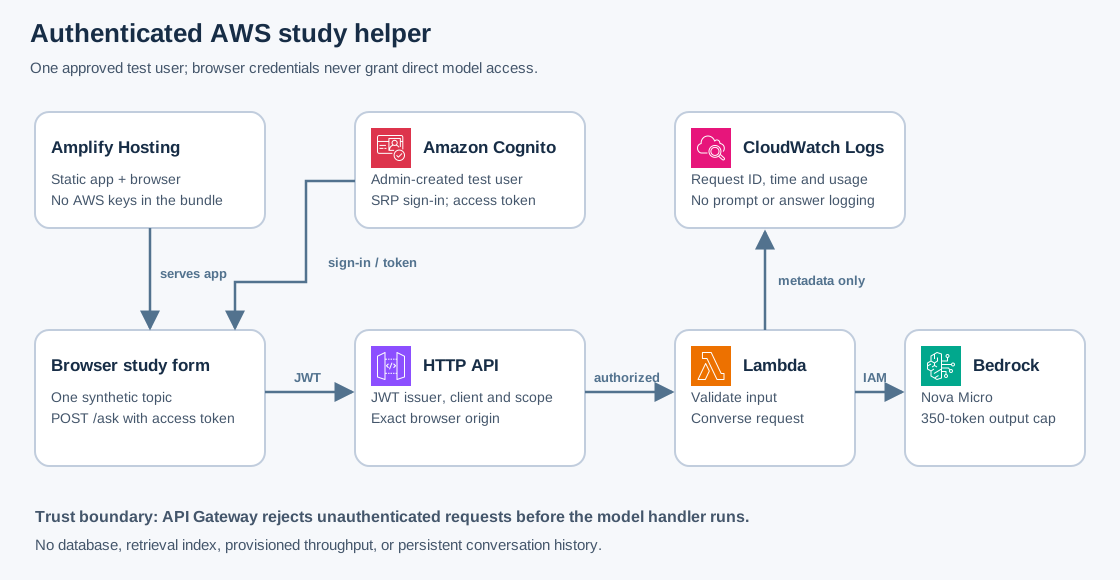
Amplify Hosting serves static files. Cognito authenticates a manually created test user. API Gateway validates the access token before invoking Lambda. Lambda checks input length and calls the Bedrock Converse API using its execution role. CloudWatch receives request identifiers, timing, and token counts, not prompts or answers.
The browser receives public pool/client IDs and an API URL, but no client secret, IAM key, or Bedrock API key. The only model permission is bedrock:InvokeModel on one foundation-model ARN. CORS restricts browser origins; Cognito authorization is the actual access control. JWT authorizers, Converse permissions
Prerequisites
- An approved disposable account and temporary AWS CLI credentials; Bash,
jq, Python 3,zip, and a Node.js version supported by the current Vite release on your workstation. - Provisioning permissions for this project's Cognito pool/client/users, Lambda function, HTTP API, Amplify app, IAM role/inline policy, and CloudWatch log group, including cleanup.
iam:PassRoleshould be limited to the created Lambda role and the Lambda service. The model preflight also needsbedrock:InvokeModelfor the selected model. - Use
us-east-1for all backend commands. This version uses in-Regionamazon.nova-micro-v1:0, whose documented availability includes that Region. Check the current model card and account access before provisioning. A cross-Region inference profile requires a different IAM policy and is outside this version. Nova Micro model card - One synthetic username and a new test password kept in your password manager. Do not use real learner accounts, reuse a personal password, or send invitations to anyone.
Steps
1. Establish the workbench and model access
Run from a new local folder; keep the same Bash session and recorded resource IDs until cleanup. Replace the suffix with a short unique value.
export AWS_REGION=us-east-1
export AWS_DEFAULT_REGION="$AWS_REGION"
aws sts get-caller-identity
ACCOUNT_ID=$(aws sts get-caller-identity --query Account --output text)
SUFFIX="replace-with-your-unique-suffix"
NAME="cloudadhar-study-${SUFFIX}"
MODEL_ID="amazon.nova-micro-v1:0"
MODEL_ARN="arn:aws:bedrock:${AWS_REGION}::foundation-model/${MODEL_ID}"
aws bedrock-runtime converse --model-id "$MODEL_ID" \
  --messages '[{"role":"user","content":[{"text":"Explain an S3 bucket in one sentence."}]}]' \
  --inference-config maxTokens=60,temperature=0.2 \
  --query 'output.message.content' --output json
This is one billable inference test if it succeeds. Resolve access, Region, or quota errors first. Current model-access behavior differs by provider and account; this Amazon-model project does not require following the old tutorial's Anthropic request process. Do not replace the scoped policy with all-model access to bypass a failed preflight. Current Bedrock model access
2. Create a closed test user pool
Create a pool that disables self-service registration and a public app client that supports SRP sign-in. Access tokens last fifteen minutes; the refresh token lasts one day. These are workshop choices, not a complete production authentication policy.
POOL_ID=$(aws cognito-idp create-user-pool --pool-name "$NAME" \
  --admin-create-user-config AllowAdminCreateUserOnly=true \
  --deletion-protection INACTIVE --mfa-configuration OFF \
  --policies '{"PasswordPolicy":{"MinimumLength":12,"RequireUppercase":true,"RequireLowercase":true,"RequireNumbers":true,"RequireSymbols":true}}' \
  --query UserPool.Id --output text)
CLIENT_ID=$(aws cognito-idp create-user-pool-client --user-pool-id "$POOL_ID" \
  --client-name study-browser --no-generate-secret \
  --explicit-auth-flows ALLOW_USER_SRP_AUTH ALLOW_REFRESH_TOKEN_AUTH \
  --prevent-user-existence-errors ENABLED --enable-token-revocation \
  --access-token-validity 15 --id-token-validity 15 --refresh-token-validity 1 \
  --token-validity-units AccessToken=minutes,IdToken=minutes,RefreshToken=days \
  --query UserPoolClient.ClientId --output text)
printf 'Pool: %s\nClient: %s\n' "$POOL_ID" "$CLIENT_ID"
In Cognito, open this exact pool, choose Users, then Create user. Use the synthetic username study-tester, choose not to send an invitation, and set a temporary password meeting the policy. Do not enter an email or phone number. The interface below handles the first-sign-in password replacement. Record the password privately; do not paste it into commands or screenshots.
3. Create the model execution role
Create the log group explicitly, so the runtime role needs permission only to create streams and write events in that group. The trust policy permits Lambda to assume the role.
FUNCTION_NAME="$NAME"
ROLE_NAME="${NAME}-runtime"
LOG_GROUP="/aws/lambda/$FUNCTION_NAME"
aws logs create-log-group --log-group-name "$LOG_GROUP"
aws logs put-retention-policy --log-group-name "$LOG_GROUP" --retention-in-days 1
cat > lambda-trust.json <<'JSON'
{"Version":"2012-10-17","Statement":[{"Effect":"Allow","Principal":{"Service":"lambda.amazonaws.com"},"Action":"sts:AssumeRole"}]}
JSON
aws iam create-role --role-name "$ROLE_NAME" \
  --assume-role-policy-document file://lambda-trust.json
ROLE_ARN="arn:aws:iam::${ACCOUNT_ID}:role/${ROLE_NAME}"
jq -n --arg model "$MODEL_ARN" \
  --arg logs "arn:aws:logs:${AWS_REGION}:${ACCOUNT_ID}:log-group:${LOG_GROUP}:*" \
  '{Version:"2012-10-17",Statement:[
    {Effect:"Allow",Action:"bedrock:InvokeModel",Resource:$model},
    {Effect:"Allow",Action:["logs:CreateLogStream","logs:PutLogEvents"],Resource:$logs}
  ]}' > runtime-policy.json
aws iam put-role-policy --role-name "$ROLE_NAME" \
  --policy-name StudyRuntime --policy-document file://runtime-policy.json
4. Implement the bounded server-side request
Save this original handler as study.py. The system instruction shapes answers but is not a security boundary or a guarantee against hallucination. No tools, private data, or executable model actions are exposed.
import base64
import json
import os
import time
import boto3
from botocore.config import Config

runtime = boto3.client(
    "bedrock-runtime",
    config=Config(connect_timeout=3, read_timeout=20,
                  retries={"total_max_attempts": 1}),
)

def reply(status, value):
    return {"statusCode": status,
            "headers": {"content-type": "application/json",
                        "cache-control": "no-store"},
            "body": json.dumps(value)}

def handler(event, context):
    claims = (event.get("requestContext", {}).get("authorizer", {})
              .get("jwt", {}).get("claims", {}))
    if (claims.get("token_use") != "access"
            or claims.get("client_id") != os.environ["CLIENT_ID"]
            or not claims.get("sub")):
        return reply(401, {"error": "Sign in to use the study helper."})
    try:
        raw = event.get("body") or ""
        if len(raw) > 6000:
            return reply(400, {"error": "Request is too large."})
        if event.get("isBase64Encoded"):
            raw = base64.b64decode(raw, validate=True).decode("utf-8")
        data = json.loads(raw)
        if not isinstance(data, dict) or set(data) != {"topic"}:
            return reply(400, {"error": "Send a topic only."})
        topic = data["topic"]
        if not isinstance(topic, str) or not 3 <= len(topic.strip()) <= 600:
            return reply(400, {"error": "Use a topic of 3 to 600 characters."})
    except (ValueError, TypeError, UnicodeError):
        return reply(400, {"error": "Invalid request body."})
    started = time.monotonic()
    try:
        result = runtime.converse(
            modelId=os.environ["MODEL_ID"],
            system=[{"text": (
                "You help adults study AWS concepts. Give a short explanation, "
                "one practical example, and one original practice question. "
                "Say when uncertain. Do not claim questions are official exams. "
                "Remind the learner to verify claims in AWS documentation."
            )}],
            messages=[{"role": "user", "content": [{"text": topic.strip()}]}],
            inferenceConfig={"maxTokens": 350, "temperature": 0.2},
        )
        answer = "\n".join(part["text"] for part in
                           result["output"]["message"]["content"] if "text" in part)
        print(json.dumps({"request_id": context.aws_request_id,
                          "elapsed_ms": round((time.monotonic() - started) * 1000),
                          "usage": result.get("usage", {})}))
        return reply(200, {"answer": answer})
    except Exception as error:
        print(json.dumps({"request_id": context.aws_request_id,
                          "error_type": type(error).__name__}))
        return reply(503, {"error": "Model request failed. Check the workbench configuration."})
The Python Lambda runtime provides Boto3 for this small exercise. For a maintained application, package and test your own dependency versions. Create the function after allowing the new IAM role to propagate; a role-assumption error at creation is a reason to check the trust and retry, not broaden its policy.
zip function.zip study.py
jq -n --arg model "$MODEL_ID" --arg client "$CLIENT_ID" \
  '{Variables:{MODEL_ID:$model,CLIENT_ID:$client}}' > environment.json
aws lambda create-function --function-name "$FUNCTION_NAME" \
  --runtime python3.13 --handler study.handler --role "$ROLE_ARN" \
  --zip-file fileb://function.zip --timeout 25 --memory-size 256 \
  --environment file://environment.json
aws lambda wait function-active-v2 --function-name "$FUNCTION_NAME"
FUNCTION_ARN="arn:aws:lambda:${AWS_REGION}:${ACCOUNT_ID}:function:${FUNCTION_NAME}"
5. Put authentication in front of the endpoint
This route requires a Cognito access-token scope, not merely an ID token. SRP/API sign-in issues the aws.cognito.signin.user.admin scope for the user's Cognito self-service operations; it does not grant AWS account administrator access. The dedicated pool, app client, and disabled public signup bound this prototype's audience. A multi-role application should define its own authorization model and business scopes. Cognito API authentication scopes
API_ID=$(aws apigatewayv2 create-api --name "$NAME" --protocol-type HTTP \
  --cors-configuration '{"AllowOrigins":["http://localhost:5173"],"AllowMethods":["POST"],"AllowHeaders":["content-type","authorization"],"MaxAge":300}' \
  --query ApiId --output text)
INTEGRATION_ID=$(aws apigatewayv2 create-integration --api-id "$API_ID" \
  --integration-type AWS_PROXY --integration-uri "$FUNCTION_ARN" \
  --payload-format-version 2.0 --query IntegrationId --output text)
AUTHORIZER_ID=$(aws apigatewayv2 create-authorizer --api-id "$API_ID" \
  --name StudyUser --authorizer-type JWT \
  --identity-source '$request.header.Authorization' \
  --jwt-configuration "Audience=$CLIENT_ID,Issuer=https://cognito-idp.${AWS_REGION}.amazonaws.com/${POOL_ID}" \
  --query AuthorizerId --output text)
aws apigatewayv2 create-route --api-id "$API_ID" --route-key 'POST /ask' \
  --target "integrations/$INTEGRATION_ID" --authorization-type JWT \
  --authorizer-id "$AUTHORIZER_ID" --authorization-scopes aws.cognito.signin.user.admin
aws lambda add-permission --function-name "$FUNCTION_NAME" \
  --statement-id StudyHttpApi --action lambda:InvokeFunction \
  --principal apigateway.amazonaws.com \
  --source-arn "arn:aws:execute-api:${AWS_REGION}:${ACCOUNT_ID}:${API_ID}/*/POST/ask"
aws apigatewayv2 create-stage --api-id "$API_ID" --stage-name '$default' \
  --auto-deploy --default-route-settings ThrottlingBurstLimit=2,ThrottlingRateLimit=1
API_URL="https://${API_ID}.execute-api.${AWS_REGION}.amazonaws.com"
curl -i -X POST "$API_URL/ask" -H 'content-type: application/json' \
  --data '{"topic":"S3 versioning"}'
The unauthenticated request must return 401. If it returns model output, stop: inspect the route authorization before proceeding. Gateway throttling is best effort and not a hard spending cap. HTTP API throttling
6. Build the browser workbench
Create a vanilla Vite app and install Amplify's frontend authentication library. Keep the generated lockfile so your own reruns use the same resolved versions.
npm create vite@latest study-web -- --template vanilla
cd study-web
npm install
npm install aws-amplify@6
cat > .env.local <<EOF
VITE_POOL_ID=$POOL_ID
VITE_CLIENT_ID=$CLIENT_ID
VITE_API_URL=$API_URL
EOF
Replace src/main.js with this code. The Vite scaffold already imports that file from index.html. No React or Amplify-managed backend is required. These environment values are public configuration, not secrets.
import { Amplify } from 'aws-amplify';
import { signIn, confirmSignIn, fetchAuthSession, signOut } from 'aws-amplify/auth';
Amplify.configure({ Auth: { Cognito: {
  userPoolId: import.meta.env.VITE_POOL_ID,
  userPoolClientId: import.meta.env.VITE_CLIENT_ID
} } });

document.querySelector('#app').innerHTML = `
  <main style="max-width:44rem;margin:2rem auto;padding:1rem;font:1rem/1.6 sans-serif">
    <h1>AWS study workbench</h1>
    <p>Use invented topics only. Verify generated answers in AWS documentation.</p>
    <form id="login">
      <label>Test username <input id="username" autocomplete="username" required></label><br>
      <label>Password <input id="password" type="password" autocomplete="current-password" required></label><br>
      <button>Sign in</button>
    </form>
    <form id="replacement" hidden>
      <label>New test password <input id="new-password" type="password" autocomplete="new-password" minlength="12" required></label>
      <button>Set password</button>
    </form>
    <form id="question" hidden>
      <label for="topic">AWS topic</label><br>
      <textarea id="topic" minlength="3" maxlength="600" rows="4" required style="width:100%;box-sizing:border-box"></textarea><br>
      <button>Generate study notes</button>
    </form>
    <button id="logout" hidden>Sign out</button>
    <p id="status" role="status" aria-live="polite"></p>
    <pre id="answer" style="white-space:pre-wrap;font:inherit"></pre>
  </main>`;
const el = id => document.getElementById(id);
function showSession(signedIn) {
  el('login').hidden = signedIn;
  el('replacement').hidden = true;
  el('question').hidden = !signedIn;
  el('logout').hidden = !signedIn;
}
function nextStep(result) {
  if (result.isSignedIn) {
    showSession(true);
    el('status').textContent = 'Signed in to the workbench.';
  } else if (result.nextStep.signInStep === 'CONFIRM_SIGN_IN_WITH_NEW_PASSWORD_REQUIRED') {
    el('login').hidden = true;
    el('replacement').hidden = false;
    el('status').textContent = 'Set a new password for this test account.';
  } else {
    throw new Error('This workbench requires the documented test user configuration.');
  }
}
function handle(form, operation) {
  el(form).addEventListener('submit', async event => {
    event.preventDefault();
    const button = event.currentTarget.querySelector('button');
    button.disabled = true;
    el('status').textContent = 'Working…';
    try { await operation(); }
    catch (error) { el('status').textContent = error.message || 'Request failed.'; }
    finally { button.disabled = false; }
  });
}
handle('login', async () => {
  const result = await signIn({ username: el('username').value.trim(), password: el('password').value });
  el('password').value = '';
  nextStep(result);
});
handle('replacement', async () => {
  const result = await confirmSignIn({ challengeResponse: el('new-password').value });
  el('new-password').value = '';
  nextStep(result);
});
handle('question', async () => {
  const { tokens } = await fetchAuthSession();
  if (!tokens?.accessToken) throw new Error('Sign in again.');
  const response = await fetch(import.meta.env.VITE_API_URL + '/ask', {
    method: 'POST',
    headers: { 'content-type': 'application/json', authorization: 'Bearer ' + tokens.accessToken.toString() },
    body: JSON.stringify({ topic: el('topic').value.trim() })
  });
  const body = await response.json();
  if (!response.ok) throw new Error(body.error || 'Request failed (' + response.status + ').');
  el('answer').textContent = body.answer;
  el('status').textContent = 'Generated notes. Check their accuracy before relying on them.';
});
el('logout').addEventListener('click', async () => {
  try {
    await signOut();
    showSession(false);
    el('answer').textContent = '';
    el('topic').value = '';
    el('status').textContent = 'Signed out of this browser.';
  } catch { el('status').textContent = 'Sign-out failed. Retry before leaving this shared device.'; }
});
fetchAuthSession().then(({ tokens }) => showSession(Boolean(tokens?.accessToken)))
  .catch(() => showSession(false));
Run npm run dev -- --port 5173 --strictPort. Sign in at http://localhost:5173, replace the temporary password, and submit Explain when S3 versioning helps recover an overwritten object. Expect a generated explanation, example, and practice question; wording varies. The returned text is rendered as text, not HTML. Amplify sign-in and challenges
7. Publish the static client and narrow CORS
Run npm run build. Zip the contents of dist, with index.html at the ZIP root. In Amplify Hosting choose Create new app, Deploy without Git, app name matching NAME, branch workbench, and upload the ZIP using the desktop upload option. This publishes static files; it does not create or manage the backend resources above. Amplify manual deployment
Record the app ID and HTTPS branch URL from Amplify. In the original Bash session, set APP_ID to that exact ID and APP_ORIGIN to the URL's origin with no trailing slash. Replace the development CORS origin, rather than adding a wildcard:
APP_ID="REPLACE_WITH_THIS_AMPLIFY_APP_ID"
APP_ORIGIN="https://workbench.REPLACE_WITH_APP_DOMAIN.amplifyapp.com"
jq -n --arg origin "$APP_ORIGIN" \
  '{AllowOrigins:[$origin],AllowMethods:["POST"],AllowHeaders:["content-type","authorization"],MaxAge:300}' > cors.json
aws apigatewayv2 update-api --api-id "$API_ID" --cors-configuration file://cors.json
Open the hosted URL, sign in again on that origin, and repeat one request. A CORS failure usually means a mismatched scheme, hostname, port, or trailing slash; a 401 indicates token/issuer/client configuration; 403 can indicate a missing scope; 503 directs you to Lambda's metadata-only error type and the model preflight. Do not put AWS keys into Vite variables to repair an authorization error.
Verification
Record actual outcomes without saving passwords, tokens, raw prompts, or user claims. Browser developer tools can show status codes without copying Authorization headers.
| Check | Expected observation |
|---|---|
| POST without an Authorization header | 401; no successful model response |
| Sign in with administrator-created user | Password replacement once, then access to the form |
| Hosted request with the access token | 200 and a nonempty answer |
| Replace access token with ID token in a controlled local test | Denied by route scope or handler checks |
| Topic longer than 600 characters sent directly with a valid token | 400 from Lambda; no model invocation for that request |
| Lambda log inspection | Request ID, duration and token usage; no application prompt/answer logging |
| Browser bundle/configuration inspection | Public IDs only; no IAM secret or app-client secret |
For direct authenticated negative tests, use the browser's network tooling locally and discard exported request data; never paste a bearer token into shared notes. The HTML length limit is convenience only; the Lambda validation must independently enforce the same boundary.
Sign-out clears this browser's session, but do not claim it immediately invalidates a previously copied JWT at API Gateway. Short token lifetime reduces that exposure. This prototype also lacks per-user request quotas, content moderation, and verified grounding; keep its audience to your test account.
Cost and cleanup
Charges can include Bedrock input/output tokens, Lambda requests/runtime, API Gateway requests, Cognito active users, Amplify hosting/storage/data transfer, and CloudWatch logs. The handler caps output at 350 tokens and accepts one bounded topic per call, but these are not a spending guarantee. No provisioned throughput, vector database, NAT gateway, or custom domain is created. Check Bedrock, Amplify, Cognito, Lambda, API Gateway, and CloudWatch pricing. Set a budget alert before starting; alerts do not stop usage.
Sign out and stop Vite with Ctrl+C. Verify the recorded names and account, then delete this project's resources in this order. Do not substitute another app, pool, or function ID.
aws sts get-caller-identity
aws amplify delete-app --app-id "$APP_ID"
aws apigatewayv2 delete-api --api-id "$API_ID"
aws lambda delete-function --function-name "$FUNCTION_NAME"
aws logs delete-log-group --log-group-name "$LOG_GROUP"
aws cognito-idp delete-user-pool-client --user-pool-id "$POOL_ID" --client-id "$CLIENT_ID"
aws cognito-idp delete-user-pool --user-pool-id "$POOL_ID"
aws iam delete-role-policy --role-name "$ROLE_NAME" --policy-name StudyRuntime
aws iam delete-role --role-name "$ROLE_NAME"
Deleting the pool removes its test users. The shared managed foundation model itself is not a resource you created and must not be deleted; no provisioned model endpoint exists to clean up. If you stopped before hosting, skip the Amplify deletion. Check that the exact API, function, log group, pool, role, and Amplify app are absent in their consoles, and review billing after usage data arrives. If you created a budget solely for this exercise, open Billing and Cost Management, Budgets, select that exact budget, and delete it after reviewing the final charges; retain existing account-wide budgets. Remove the local build ZIP, test password, .env.local, and browser storage for the two workbench origins when finished. Never delete unrelated model access or account configuration.
References
- AWS inspiration: generative AI web application tutorial
- AWS: Nova Micro model card and regional availability
- AWS: current model access
- AWS: Converse API
- AWS: HTTP API JWT authorizers
- AWS: Cognito API authentication scopes
- AWS: Amplify authentication sign-in
- AWS: Amplify manual static deployments
- AWS CLI: Cognito public app clients