
Overview
A campus club runs a nightly registration export. Its organizer wants a short notification when the export finishes. Build the notification channel using synthetic data, then demonstrate the difference between accepting a publish request and delivering an email.
You will create one topic, subscribe one inbox that you own, and send two identifiable test notifications. This exercise does not configure a scheduled export. You act as the publisher and recipient so that you can investigate the entire delivery path without contacting other people.
Architecture
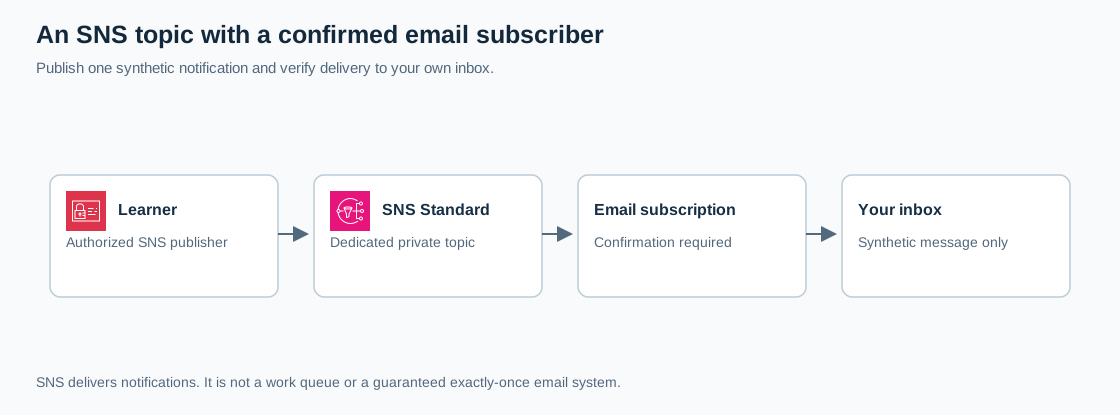
Open the full-size architecture diagram
IAM authorizes publishing; SNS routes the message; the confirmed subscription identifies the destination. A topic ARN is a resource identifier, not a password. Knowing it does not grant permission to publish.
SNS fits simple operational notifications and fan-out to subscribers. Choose Amazon SES when an application needs a designed email experience or sender-domain control. Add SQS when a program needs a queue it can consume independently. An inbox is not a durable job-processing system. SNS email endpoints use Standard topics and require confirmation. AWS email subscription guidance
Prerequisites
- An isolated AWS learning account, an authorized role, and one inbox that you own and designate for this lab. Do not use a mailing list, another person's address, or a production alert address.
- Permission to create, inspect, publish to, and delete the lab SNS topic; create, inspect, and remove its subscription; and open CloudShell. Setup needs SNS create/list/get/subscribe/publish/unsubscribe/delete operations. Your organization may provide a prepared learning role.
- Use
us-east-1throughout. Allow time to receive and personally confirm the subscription email. - Basic JSON familiarity. Use synthetic values only; notification bodies and email addresses should not appear in public screenshots.
Steps
1. Verify your account and region
Sign in with your learning role. Open CloudShell from the AWS console and run:
aws sts get-caller-identity --query '{Account:Account,Arn:Arn}'Confirm the account and role match your learning environment. Select us-east-1 in the SNS console. Record a unique topic name such as cloudadhar-export-notices-YOUR-SUFFIX in your lab notes; keep personal information out of the name.
2. Create the delivery topic
In SNS, choose Topics, Create topic, then Standard. Enter your chosen name. Keep the default owner-restricted access policy. Leave optional encryption and delivery logging unconfigured for these nonsensitive test messages; organizational encryption requirements take precedence and may require additional KMS permissions.
Create the topic and copy its ARN. Check that its ARN contains your account, selected region, and exact topic name. Email subscriptions cannot use a FIFO topic. Do not add a public publish or subscribe statement to solve an access error. AWS topic configuration
3. Subscribe and confirm your own inbox
From the topic, choose Create subscription. Select Email and enter only your designated inbox. Leave filtering and redrive options unset. Create the subscription.
The initial status is Pending confirmation. Open the confirmation email yourself, check the topic information, and choose Confirm subscription. Refresh SNS until the subscription has an ARN instead of a pending status. Check spam or your organization's quarantine if necessary; do not repeatedly create subscriptions while waiting.
Checkpoint: there is exactly one confirmed email subscription, and its endpoint is your intended address. Confirmation links and unsubscribe links must stay out of shared evidence.
4. Publish a recognizable notification
Open the topic's Publish message action. Use subject CloudAdhar lab: export completed. Choose an identical payload for all delivery protocols and paste this plain text:
event_id=demo-export-001
status=completed
registration_count=3
environment=disposable-learning-lab
Publish once. Save the returned SNS MessageId and your publish timestamp. In your inbox, verify the subject and all four values. A successful publish response proves SNS accepted the request; the received email provides separate delivery evidence. Allow for mail-system delays. AWS publishing guidance
5. Repeat through the CLI
In the same CloudShell session, replace the placeholder ARN before running:
LAB_TOPIC_ARN='REPLACE_WITH_YOUR_TOPIC_ARN'
aws sns publish \
  --region us-east-1 \
  --topic-arn "$LAB_TOPIC_ARN" \
  --subject 'CloudAdhar lab: second delivery' \
  --message 'event_id=demo-export-002; status=completed; registration_count=3'
Expect JSON containing a new MessageId and a second email containing demo-export-002. You did not configure access keys: CloudShell uses your signed-in identity's permissions. Stop after these two tests.
For a future application publisher, the relevant identity permission can be limited to this topic:
{
  "Version": "2012-10-17",
  "Statement": [{
    "Effect": "Allow",
    "Action": "sns:Publish",
    "Resource": "REPLACE_WITH_YOUR_TOPIC_ARN"
  }]
}
This example is a publisher policy, not the broader setup policy and not a topic resource policy. No additional application role is needed for this exercise.
6. Diagnose the delivery path
If publishing returns AccessDenied, check your identity policy, account, topic ARN, and any organization restrictions. If publishing succeeds but mail is absent, inspect the confirmed endpoint, subscription filters, and mail quarantine. Email delivery does not support arbitrary custom formatting, and Standard delivery should not be treated as exactly once.
Explain how an application-generated event ID helps identify repeated events even when separate publish requests receive different SNS message IDs. Save observations rather than assuming that API success means a human read the message.
Verification
| Check | Expected evidence |
|---|---|
| Identity | Intended account and learning role |
| Subscription | One confirmed endpoint belonging to you |
| First publish | MessageId plus email containing demo-export-001 |
| Second publish | Different MessageId plus demo-export-002 |
| Access | Topic remains restricted to authorized identities |
Keep a small record of event ID, publish time, and observed arrival time. Redact account identifiers, email addresses, and subscription links before sharing your work.
Cost and cleanup
SNS API requests and email deliveries can incur charges; Free Tier eligibility varies. Optional KMS encryption and logging add separate usage. This lab needs only one topic, one subscription, and two publishes. SNS pricing
In SNS, select the confirmed lab subscription and delete it. Then delete only the dedicated lab topic and verify both are absent in us-east-1. Deleting the topic removes associated subscriptions, including any still awaiting confirmation; it does not remove emails already received. Remove the lab emails and close CloudShell. No IAM application role was created by these steps. AWS SNS cleanup