
Overview
A student team needs its automation to upload a build artifact to AWS. Configure GitHub Actions to obtain temporary AWS credentials using OpenID Connect, then prove that the permitted branch succeeds and another branch cannot assume the role.
The result is a private artifact in S3, not a public website. You will create no IAM user or long-lived access key. Authentication answers which workflow is running; the role's permissions separately restrict what that workflow can do.
Architecture
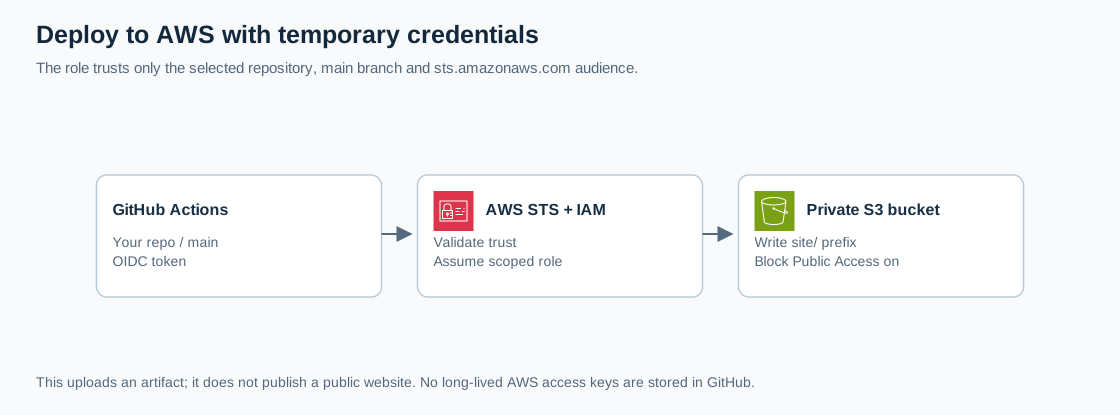
Open the full-size architecture diagram
GitHub issues a signed identity token. AWS STS checks the IAM trust policy and returns short-lived role credentials. The workflow uses those credentials to list, read, and write only the dedicated bucket's site/ prefix. S3 stores the artifact independently of the runner.
OIDC avoids distributing static AWS keys to a CI system. Repository review and branch protection still matter: code that reaches the trusted branch can exercise its deployment permissions. GitHub OIDC guidance
Prerequisites
- Your own disposable GitHub repository with a
mainbranch, Actions enabled, and permission to edit workflow files and repository variables. Use GitHub-hosted Ubuntu runners. - An AWS learning account and a setup role allowed to create/delete a dedicated S3 bucket, manage its objects, create an IAM OIDC provider if necessary, and create/manage/delete the lab role and its inline policy.
- Use
us-east-1, the standard AWS partition, and a private bucket containing only this lab's data. - Use GitHub's default OIDC subject format. This workflow has no GitHub environment; environment-based subjects require a different trust condition. Organization Actions restrictions may require approval of the pinned actions.
Steps
1. Prepare the private artifact store
In S3, create a globally unique general-purpose bucket such as cloudadhar-oidc-YOUR-SUFFIX in us-east-1. Keep all Block Public Access settings enabled, ACLs disabled, and SSE-S3 encryption. Leave versioning disabled for this disposable exercise. Do not enable website hosting.
Record the bucket name, AWS account ID, and exact GitHub OWNER/REPO spelling. In your repository, create site/index.html:
<!doctype html>
<html lang="en"><meta charset="utf-8"><title>OIDC lab</title>
<body><h1>CloudAdhar deployment proof</h1><p>Build 1</p></body></html>
Commit it to main. The file contains no secrets or personal information.
2. Register GitHub's identity provider
In IAM, open Identity providers. If your account already has an approved provider for token.actions.githubusercontent.com, reuse it after verifying that its audience includes sts.amazonaws.com.
Otherwise choose Add provider, OpenID Connect, provider URL https://token.actions.githubusercontent.com, and audience sts.amazonaws.com. Record whether you created or reused it. IAM can retrieve the certificate thumbprint; do not paste a historical thumbprint from an old tutorial. AWS OIDC provider verification
3. Create an exact trust boundary
In IAM Roles, choose Create role and Custom trust policy. Replace ACCOUNT_ID and OWNER/REPO below, then name the role cloudadhar-github-deploy. Do not attach broad managed permissions.
{
  "Version": "2012-10-17",
  "Statement": [{
    "Effect": "Allow",
    "Principal": {
      "Federated": "arn:aws:iam::ACCOUNT_ID:oidc-provider/token.actions.githubusercontent.com"
    },
    "Action": "sts:AssumeRoleWithWebIdentity",
    "Condition": {
      "StringEquals": {
        "token.actions.githubusercontent.com:aud": "sts.amazonaws.com",
        "token.actions.githubusercontent.com:sub": "repo:OWNER/REPO:ref:refs/heads/main"
      }
    }
  }]
}
The exact subject excludes other repositories, pull-request subjects, and other branches. The audience limits the intended token recipient. Neither condition should use *. AWS GitHub trust configuration
Add this inline permissions policy, named LabSitePrefix, replacing YOUR_BUCKET:
{
  "Version": "2012-10-17",
  "Statement": [
    {
      "Effect": "Allow",
      "Action": "s3:ListBucket",
      "Resource": "arn:aws:s3:::YOUR_BUCKET",
      "Condition": {"StringLike": {"s3:prefix": ["site/", "site/*"]}}
    },
    {
      "Effect": "Allow",
      "Action": ["s3:PutObject", "s3:GetObject"],
      "Resource": "arn:aws:s3:::YOUR_BUCKET/site/*"
    }
  ]
}
Listing uses the bucket ARN; object access uses the prefix ARN. This role cannot delete objects, change bucket access, or deploy outside site/. The setup role, not this deployment role, performs cleanup. AWS S3 policy examples
4. Add variables and the workflow
In repository Settings, Secrets and variables, Actions, Variables, create AWS_ROLE_ARN, AWS_ACCOUNT_ID, and DEPLOY_BUCKET using your recorded values. These identifiers are configuration, not AWS credentials. Do not create access-key secrets.
Create .github/workflows/deploy.yml on main:
name: Private S3 artifact
on:
  push:
    branches: [main]
  workflow_dispatch:
permissions:
  contents: read
  id-token: write
jobs:
  deploy:
    runs-on: ubuntu-24.04
    timeout-minutes: 10
    env:
      AWS_REGION: us-east-1
      DEPLOY_BUCKET: ${{ vars.DEPLOY_BUCKET }}
    steps:
      - uses: actions/checkout@3d3c42e5aac5ba805825da76410c181273ba90b1 # v7.0.1
        with:
          persist-credentials: false
      - uses: aws-actions/configure-aws-credentials@e1253824e5c10ff9df46874f81ed3ec929e19cfd # v6.3.0
        with:
          role-to-assume: ${{ vars.AWS_ROLE_ARN }}
          allowed-account-ids: ${{ vars.AWS_ACCOUNT_ID }}
          aws-region: us-east-1
          audience: sts.amazonaws.com
          role-duration-seconds: 900
          role-session-name: GitHub-${{ github.run_id }}
          retry-max-attempts: 3
      - name: Verify identity and upload
        shell: bash
        run: |
          set -euo pipefail
          aws sts get-caller-identity
          aws s3 sync site/ "s3://${DEPLOY_BUCKET}/site/" --no-follow-symlinks --only-show-errors
          aws s3 cp "s3://${DEPLOY_BUCKET}/site/index.html" deployed-index.html --only-show-errors
          cmp site/index.html deployed-index.html
          echo "Verified identical source and S3 artifact"
The action commits above were checked against their official release tags on 2026-09-23. Review updates before changing pins. id-token: write permits token issuance, not arbitrary AWS access. The sync command deliberately omits --delete. GitHub action security and AWS sync behavior
5. Verify success and rejection
Open Actions and inspect the run. Expect an STS ARN containing assumed-role/cloudadhar-github-deploy/GitHub-, followed by Verified identical source and S3 artifact. In S3, download site/index.html through your authenticated console session and inspect it.
Change Build 1 to Build 2 on main; the next run should replace the same object. Then create a temporary branch named oidc-denied containing the workflow. Use Run workflow and select that branch. Expect role assumption to fail before upload because its subject is not the trusted main-branch subject. Do not loosen the trust policy to make this negative test pass.
If the main run fails, compare owner/repository case, branch, audience, role ARN, and variables. For S3 AccessDenied, inspect bucket/prefix spelling and account restrictions. IAM changes may require brief propagation time.
Verification
- Main obtains the intended temporary role session and verifies matching file contents.
- A second main run updates the existing
site/index.htmlartifact. - The other branch is denied at role assumption.
- The bucket remains private; no AWS access-key secrets exist.
Save redacted run IDs, branch names, expected outcomes, and an explanation of trust versus permissions. Never print or archive the OIDC token or temporary credentials.
Cost and cleanup
GitHub Actions minutes and S3 storage/requests may incur charges. Use tiny files and a few runs; check your account allowances before running. OIDC does not remove the cost of the resources used by a workflow.
Disable or remove the lab workflow first. With your setup role, empty only the dedicated bucket and delete it; remove all versions if you enabled versioning. Delete LabSitePrefix and the dedicated IAM role. Delete the OIDC provider only if this lab created it and no other role uses it. Remove the three repository variables and temporary test branch. Confirm the bucket and role are absent, retaining your evidence locally.